
Nissan Armada 2025-2026 Owner's Manual: How to enable/disable the sonar system
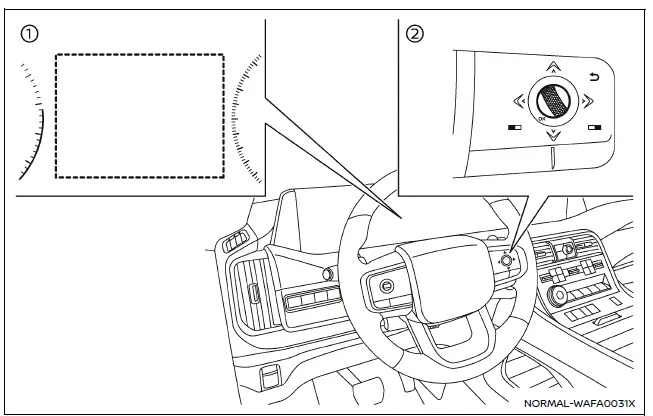
- Vehicle information display
- Steering-wheel-mounted control (right side)
The Nissan Armada sonar system is automatically activated when the ignition is in the ON position and the transmission is placed in D (Drive) or R (Reverse), ensuring immediate assistance during low-speed maneuvers.
To customize the sonar system settings in the Nissan Armada, follow these steps carefully:
1. Press the
 button until "Settings" appears in the vehicle information display, then press the
scroll dial. Use the scroll dial to navigate to "Driver Assistance" and confirm
your selection.
button until "Settings" appears in the vehicle information display, then press the
scroll dial. Use the scroll dial to navigate to "Driver Assistance" and confirm
your selection.
2. Select "Parking Assist" and press the scroll dial to access sonar-related settings.
3. Navigate through the menu using the scroll dial to configure the following Nissan Armada features:
- Rear Cross Traffic Alert
- Enables or disables the Rear Cross Traffic Alert system for safer reversing.
- Moving Object (if so equipped)
- Turns ON/OFF the Moving Object Detection (MOD) system for enhanced awareness.
- Front Sonar
- Activates or deactivates the front sonar sensors in the Nissan Armada.
- Rear Sonar
- Activates or deactivates the rear sonar sensors.
- Sonar Distance
- Adjusts detection sensitivity to "Long," "Medium," or "Short" depending on driving preferences.
- Auto Show Sonar
- Displays the sonar view automatically in the Nissan Armada information display when sensors detect nearby objects.
- Sonar Volume
- Adjusts the alert tone volume to "High," "Medium," or "Low" for optimal audibility.
 System operation
The Nissan Armada sonar system provides both visual and audible alerts under
the following conditions:
Detection of front obstacles when the transmission is in D (Drive)
Detection of both fron ...
 Sonar system limitations
WARNING
The following limitations apply to the Nissan Armada sonar system. Failure
to understand and follow these limitations may result in serious injury or even
fatal accidents.
Carefully r ...
Other materials:
Rear Side Door Weatherstrip Replacement - Door Side
Rear Side Door Weatherstrip Replacement - Door Side
Callout
Component Name
1
Rear Side Door Weatherstrip
Procedure
Open the front side door to the fully open position.
Remove the front side door check link bo ...
Throttle Body Heater Inlet Hose Replacement (LUW)
Throttle Body Heater Inlet Hose Replacement
Callout
Component Name
Preliminary Procedure
Remove the air cleaner outlet duct. Refer to Air Cleaner Outlet
Duct Replacement.
Drain the cooling system. Refer to Cooling System ...
Low and Reverse and 1-2-3-4 Clutch Housing, Low and Reverse Clutch Assembly,
Output Sun Gear, and 2-6 Clutch Plate Disassemble (Gen 1)
Low and Reverse and 1-2-3-4 Clutch Housing, Low and Reverse Clutch
Assembly, Output Sun Gear, and 2-6 Clutch Plate Disassemble
Callout
Component Name
1
1??? Clutch Backing Plate
2
1??? Clu ...

0.0116