
Chevrolet Sonic Repair Manual: Communication Interface Module Bracket Replacement
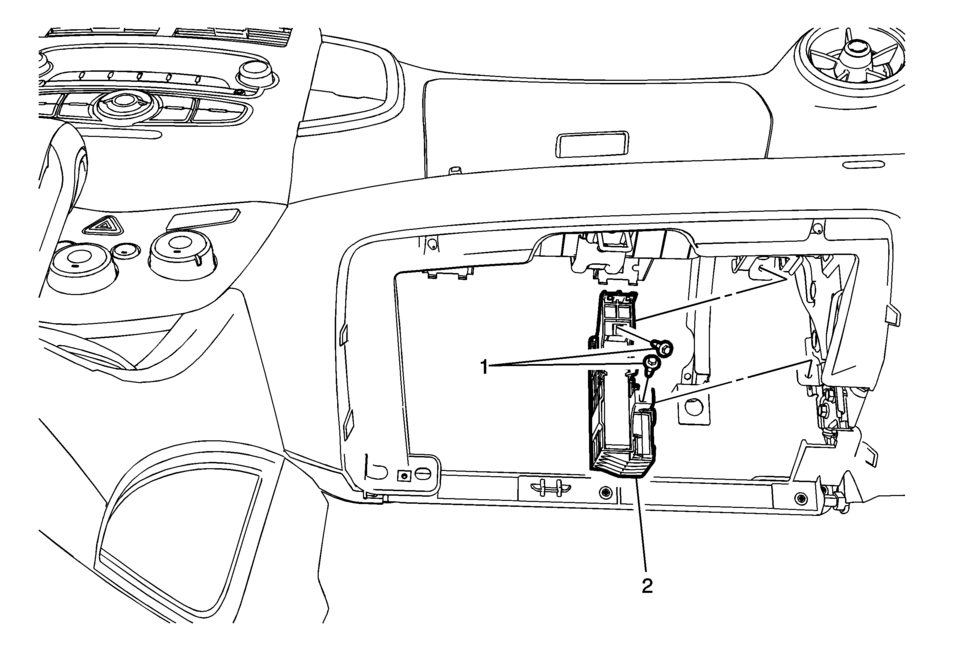
|
Callout |
Component Name |
|---|---|
|
Preliminary Procedure
Remove the instrument panel lower compartment. Refer to Instrument Panel Lower Compartment Replacement |
|
|
1 |
Communication Interface Module Bracket Bolts (Qty: 2) Caution: Refer to Fastener Caution. |
|
2 |
Communication Interface Module Bracket Procedure
|
 Communication Interface Module Battery Replacement
Callout
Component Name
Preliminary Procedure
Remove the instrument panel low ...
 Communication Interface Module Replacement
Callout
Component Name
Preliminary Procedure
Remove the instrument panel lower compartme ...
Other materials:
Parking Brake Indicator Switch Replacement
Removal Procedure
Remove the front floor console. Refer to Front Floor Console Replacement.
Ensure that the park brake lever is in the fully released position.
Disconnect the electrical connector from the park brake warning indicator
switch.
Remove the park ...
How to enable/disable the RCTA system
Vehicle information display
Steering-wheel-mounted controls (right side)
Follow these steps to activate or deactivate the Nissan Armada RCTA system:
1. Press the
button until the "Settings" menu appears in the vehicle information display, then
confirm using the scroll di ...
System temporarily unavailable
When the Nissan Armada detects that the radar sensors are obstructed, the system
will automatically deactivate to ensure safe and reliable operation.
A warning message reading "Unavailable Side Radar Obstruction" will appear in
the vehicle information display, alerting the driver that ...

0.0055