
Nissan Armada 2025-2026 Owner's Manual: Conventional (fixed speed) cruise control
Basic information
The Nissan Armada offers a Conventional (fixed speed) cruise control mode as a practical alternative to the advanced Intelligent Cruise Control system. This mode is ideal for steady highway driving when adaptive distance control is not required and allows the Nissan Armada to maintain a constant speed set by the driver.
To activate the conventional cruise control mode in the Nissan Armada:
1. Press and hold the ProPILOT Assist switch A for more than approximately 1.5 seconds until the system switches from adaptive mode to fixed-speed cruise control.
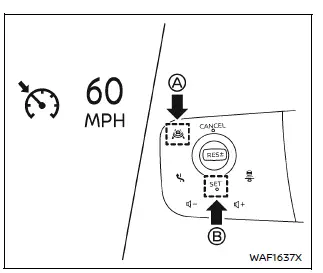
2. Once the Nissan Armada reaches the desired driving speed, press the SET switch B to store and maintain that speed.
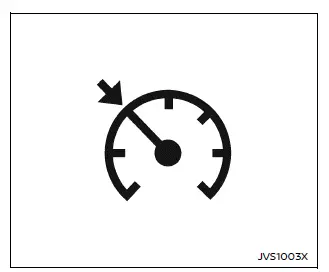
After activation, the Nissan Armada will continue traveling at the selected speed. The cruise control indicator and the set speed will be clearly displayed in the instrument cluster, confirming that the system is active and maintaining speed consistently.
Additional benefit: Using conventional cruise control in the Nissan Armada can provide a smoother and more predictable driving experience on long, open roads where traffic flow is stable.
NOTE:
When the Nissan Armada is operating in conventional (fixed speed) cruise control mode, all ProPILOT Assist-related features, including adaptive following and steering assistance, are disabled. To return to Intelligent Cruise Control (ICC), cancel the current mode if necessary, then briefly press and release the ProPILOT Assist switch.
WARNING
To prevent unintentional activation of cruise control in the Nissan Armada, always ensure that the ProPILOT Assist system is turned OFF when not in use. Unexpected engagement may lead to unsafe driving situations.
System temporarily unavailable
Under certain conditions, the Nissan Armada cruise control system may automatically deactivate. When this happens, a warning chime will sound and the system will cancel operation to maintain safety.
- When the transmission is shifted out of the D (Drive) position or manual shift mode.
- When the parking brake is engaged.
- When the Vehicle Dynamic Control (VDC) system or traction control system is actively operating.
- When the VDC system has been manually turned off.
- When wheel slip is detected, indicating reduced traction.
Warning
If the Nissan Armada cruise control system detects a malfunction, an audible chime will sound and the cruise control indicator color will change to yellow, signaling that the system requires attention.
Action to take:
If the indicator turns yellow, safely stop the Nissan Armada in a secure location. Turn the engine off, wait a moment, then restart the engine and attempt to re-engage the system.
If the system cannot be reactivated or the warning indicator remains illuminated, this may indicate a malfunction. Although the Nissan Armada can still be driven under normal conditions, it is strongly recommended to have the system inspected by an authorized NISSAN dealer to ensure proper functionality and safety.
Additional recommendation: Regularly check system indicators and ensure all sensors and related components in the Nissan Armada are functioning correctly to maintain optimal cruise control performance.
 Intelligent Cruise Control (ICC)
Basic information
The Intelligent Cruise Control (ICC) system in the Nissan Armada is an integral
component of the advanced ProPILOT Assist suite. Before using this feature, it is
strongly recomm ...
 Speed Limit Assist (a feature of ProPILOT Assist 1.1 and 2.1)
Speed Limit Assist in the Nissan Armada is an advanced functionality integrated
within the ProPILOT Assist 1.1 and 2.1 systems. This feature works in conjunction
with the built-in map locator and ...
Other materials:
Vehicle Data Recording and Privacy
The vehicle has a number of computers that record information about the vehicle’s
performance and how it is driven. For example, the vehicle uses computer modules
to monitor and control engine and transmission performance, to monitor the conditions
for airbag deployment and deploy them in a ...
Front Wheelhouse Liner Replacement (Front)
Front Wheelhouse Liner Replacement
Callout
Component Name
Preliminary Procedure
Remove the tire and wheel assembly. Refer to Tire and Wheel Removal and
Installation.
1
Front Wheelhouse Liner Scr ...
Front Side Door Window Weatherstrip Replacement
Front Side Door Window Weatherstrip Replacement
Callout
Component Name
Preliminary Procedures
Remove front side door trim panel. Refer to Front Side Door Trim
Replacement.
Remove the outside rearview mirror. Refer to Outs ...

0.0048