
Chevrolet Sonic Owner's Manual: Dinghy Towing All except RS Model with Automatic Transmission
When dinghy towing a vehicle with an automatic transmission, the vehicle should be run at the beginning of each day and at each RV fuel stop for about five minutes. This will ensure proper lubrication of transmission components.
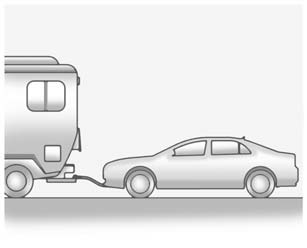
To dinghy tow the vehicle from the front with all four wheels on the ground:
1. Position the vehicle to tow and then secure it to the towing vehicle.
2. Shift the automatic transmission to P (Park) or a manual transmission into 1 (First) gear and turn the ignition to LOCK/OFF.
3. Set the parking brake.
4. To prevent the battery from draining while the vehicle is being towed, remove the following fuse from the instrument panel fuse block: (DLIS). See Instrument Panel Fuse Block for more information.
5. Turn the ignition to ACC/ ACCESSORY.
6. Shift the automatic transmission to N (Neutral) or a manual transmission to Neutral.
7. Release the parking brake.
Remember to reinstall the DLIS fuse once the destination has been reached.
Caution
If 105 km/h (65 mph) is exceeded while towing the vehicle, it could be damaged. Never exceed 105 km/h (65 mph) while towing the vehicle.
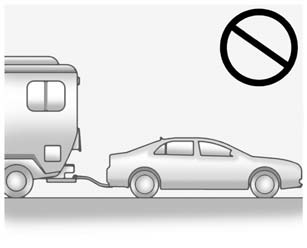
Caution
Towing the vehicle from the rear could damage it. Also, repairs would not be covered by the vehicle warranty. Never have the vehicle towed from the rear.
 Dinghy Towing RS Model with Automatic Transmission
Caution
If the vehicle is towed with all four wheels on the ground, the drivetrain
components could be damaged. The repairs would not be covered by the vehicle warranty.
Do not tow the vehicle ...
 Dolly Towing from the Front
The vehicle can be towed from the front using a dolly. To tow the vehicle using
a dolly, follow these steps:
1. Attach the dolly to the tow vehicle following the dolly manufacturer's instruct ...
Other materials:
Starting the Engine
The vehicle has a Computer-Controlled Cranking System. It assists in starting
the engine and protects components. If the ignition key is turned to START and then
released when the engine begins cranking, the engine will continue cranking for
a few seconds or until the engine starts. If the eng ...
Heated Front Seats
Warning
If you cannot feel temperature change or pain to the skin, the seat heater
may cause burns. To reduce the risk of burns, people with such a condition should
use care when using the seat heater, especially for long periods of time. Do not
place anything on the seat that insulates again ...
Steps for Determining Correct Load Limit
1. Locate the statement "The combined weight of occupants and cargo should never
exceed XXX kg or XXX lbs." on your vehicle’s placard.
2. Determine the combined weight of the driver and passengers that will be riding
in your vehicle.
3. Subtract the combined weight of the driver an ...

0.006