
Chevrolet Sonic Repair Manual: Driver or Passenger Seat Back Cover and Pad Replacement
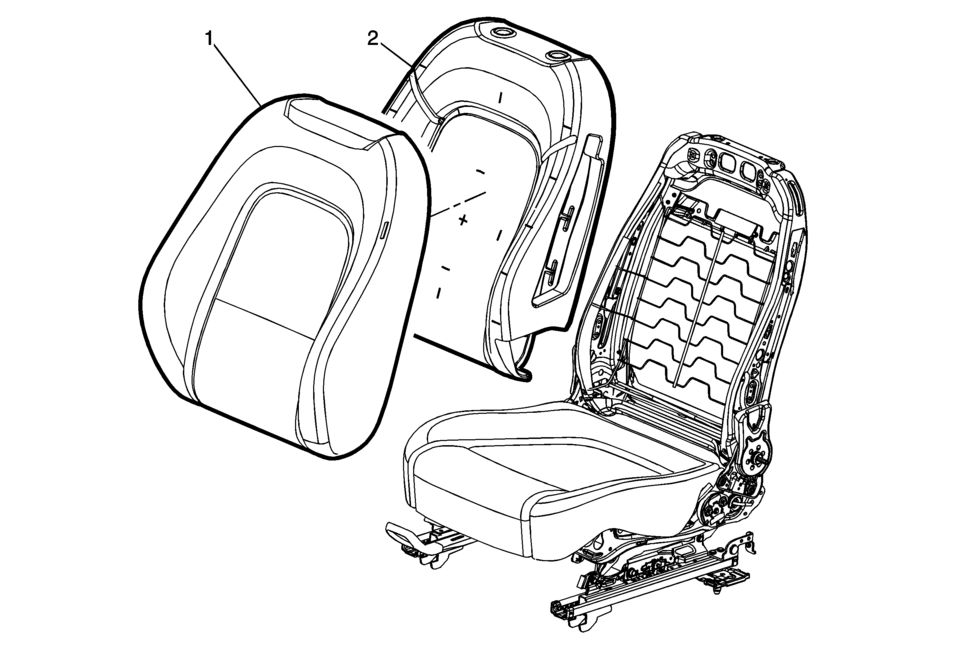
|
Callout |
Component Name |
|---|---|
|
Warning: Refer to SIR Warning. Warning: Do not repair or replace the seat stitching or seams in the seat back trim cover with an internal mounted seat side airbag module. Replace the complete seat back trim cover from the OEM. Non-OEM seat stitching may cause improper airbag deployment which could result in personal injury.
|
|
|
1 |
Seat Back Cushion Cover Procedure
|
|
2 |
Front Seat Back Cushion Pad Procedure
Pull the cushion cover assembly off of the pad. Tip: Seat back cover can be damaged upon reinstalling cover to seat back pad. When reinstalling the seat cushion cover to the seat pad, start in upper outboard corner and install outboard side of the cover. Then start at the upper inboard corner and install inboard side of cover. |
 Driver or Passenger Seat Adjuster Handle Replacement (4 Way Uplevel)
Driver or Passenger Seat Adjuster Handle Replacement
Callout
Component Name
1
Front Seat Adjuster Handle Cover
Proced ...
 Driver or Passenger Seat Back Cushion Frame Replacement
Driver or Passenger Seat Back Cushion Frame Replacement
Callout
Component Name
Preliminary Procedures
Remove the driver or passenge ...
Other materials:
Rear Brake Hose Replacement (Body to Axle - Drum Brake)
Removal Procedure
Warning: Refer to Brake Dust Warning.
Warning: Refer to Brake Fluid Irritant Warning.
Raise and support the vehicle. Refer to Lifting and Jacking the Vehicle.
Remove the tire and wheel assembly. Refer to Tire and Wheel Removal
and Install ...
Rear Side Door Window Replacement (Sedan)
Rear Side Door Window Replacement
Callout
Component Name
Warning: Refer to Glass and Sheet Metal Handling Warning.
Preliminary Procedures
Remove the rear side door trim panel. Refer to Rear Side Door Trim
...
Hood Hold-Open Rod Replacement
Hood Hold-Open Rod Replacement
Callout
Component Name
1
Hood Hold-Open Rod
Warning: When a hood hold open device is being removed or
installed, provide alternate support to avoid the possibility of damage
...

0.0068