
Chevrolet Sonic Repair Manual: Front Wheelhouse Liner Inner Front Extension Replacement (Right Side, LUV)
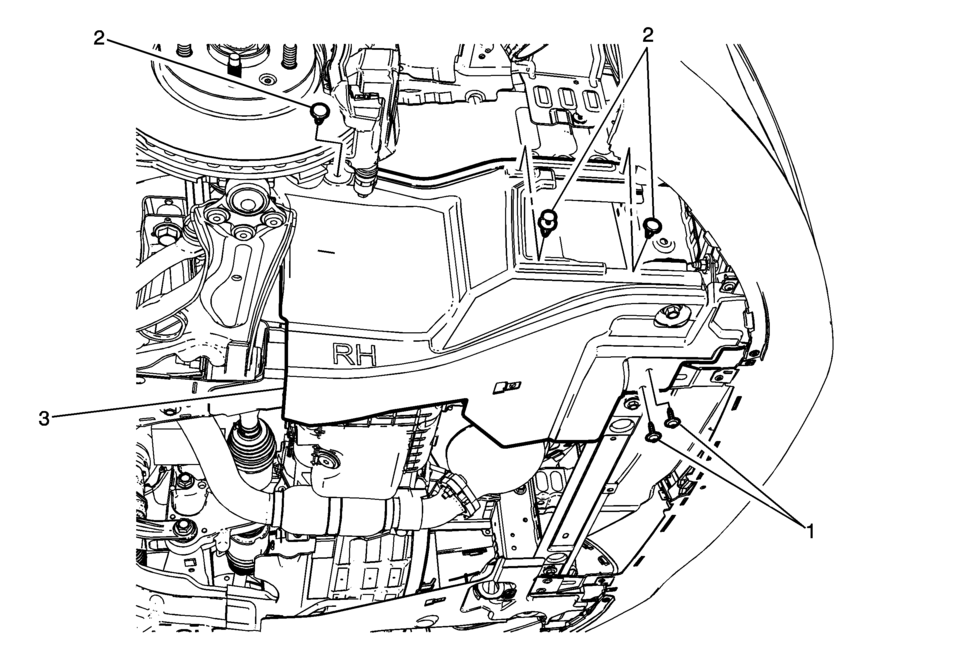
|
Callout |
Component Name |
|---|---|
Preliminary Procedure
|
|
|
1 |
Front Wheelhouse Liner Inner Front Extension Screw (Qty:?€‰2) Caution: Refer to Fastener Caution.
3?€‰Y (27?€‰lb?€‰in) |
|
2 |
Front Wheelhouse Liner Inner Front Extension Push-In Retainer (Qty:?€‰3) |
|
3 |
Front Wheelhouse Liner Inner Front Extension |
 Front Wheelhouse Liner Inner Front Extension Replacement (Right SIde, LWE, LUW)
Front Wheelhouse Liner Inner Front Extension Replacement
Callout
Component Name
Preliminary Procedure
Remove the tire and wheel ass ...
 Front Wheelhouse Liner Replacement (Front)
Front Wheelhouse Liner Replacement
Callout
Component Name
Preliminary Procedure
Remove the tire and wheel assembly. Refer to Ti ...
Other materials:
Lock Cylinder Coding - Ignition
The ignition lock cylinder uses 8 key cut positions, 1–8. The ignition cylinder
tumblers (3) are located on alternate sides of the cylinder (5). They are not snap-in
and are not self-retaining. It follows the key code with the first tumbler being
the first depth of the ...
Front Wheel Drive Shaft Seal Replacement - Case Side
Front Wheel Drive Shaft Seal Replacement - Case Side
Callout
Component Name
1
Front Wheel Drive Shaft Oil Seal
Special Tools
DT-23129 Universal Seal Remover
DT-47790 Seal Installer
GE-6125-1B Slide Hamme ...
Manual Transmission Shift Lever Cable Adjustment
Special Tools
DT-527-A Adjuster or 5mm drill bit
For equivalent regional tools, refer to Special Tools.
Note: Not using the specified tools may lead to shift system mis-adjustment.
Remove the floor console. Refer to
Front Floor Console Replacement.
Lift upward an ...

0.0059