
Chevrolet Sonic Repair Manual: Generator Pulley Replacement (LUV)
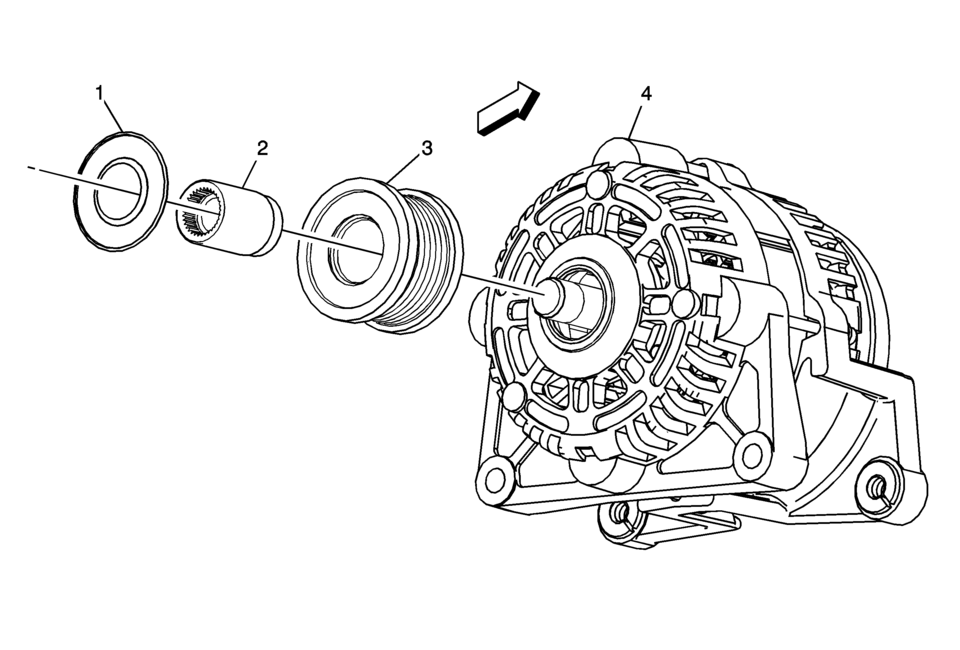
|
Callout |
Component Name |
|---|---|
|
Preliminary Procedure
Remove the generator. Refer to Generator Replacement. |
|
|
1 |
Generator Pulley Nut Cap |
|
2 |
Generator Pulley Nut Caution: Refer to Fastener Caution. Procedure
Remove the generator pulley nut by using EN-6372 counterhold . Tighten
90 Y (66 lb ft) Special Tools
EN-6372 Counterhold For equivalent regional tools, refer to Special Tools. |
|
3 |
Generator Pulley |
|
4 |
Generator |
 Power Steering Pump Belt Removal
Caution: Do not use belt dressing on the drive belt. Belt dressing
causes the breakdown of the composition of the drive belt. Failure to follow
this recommendation will damage the ...
 Starting System
...
Other materials:
When It Is Time for New Tires
Factors such as maintenance, temperatures, driving speeds, vehicle loading, and
road conditions affect the wear rate of the tires.
Treadwear indicators are one way to tell when it is time for new tires. Treadwear
indicators appear when the tires have only 1.6mm (1/16 in) or less of tread rema ...
Rear Compartment Lid Inner Panel Trim Replacement (Sedan)
Rear Compartment Lid Inner Panel Trim Replacement
Callout
Component Name
Preliminary Procedures
Remove the rear compartment lid outer bumpers.
Remove the latch cover.
1
Rear Compartment Lid Inner ...
Torque Converter Installation
Torque Converter Installation
Callout
Component Name
1
Torque Converter Assembly
Note: Failure to lower the torque converter straight down
could damage the torque converter clutch lip seal inside the torque ...

0.0056