
Nissan Armada 2025-2026 Owner's Manual: Hands On Detection
Basic information
In the Nissan Armada, the Hands On Detection system is an essential safety feature integrated within Steering Assist and ProPILOT Assist technologies. This system continuously monitors the driver’s interaction with the steering wheel through built-in sensors, ensuring that the driver remains actively engaged while driving.
When ProPILOT Assist is operating in Hands On (green) mode in the Nissan Armada, the system expects the driver to maintain contact with the steering wheel. If no steering input is detected or the driver removes their hands for a certain period, a warning message 1 appears and the hands-off warning indicator 2 illuminates. If no corrective action is taken, the system escalates alerts progressively to prompt driver intervention.
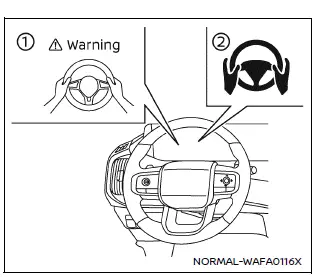
The Hands On Detection function in the Nissan Armada is also required for additional ProPILOT Assist 2.1 features. These include advanced systems such as Lane Change Assist and Passing Assist, especially when Easy Assist is active, ensuring the driver remains in control at all times.
NOTE:
The Nissan Armada Hands On Detection system may not accurately detect the driver’s hands under certain conditions:
- When gloves are worn.
- When a steering wheel cover is installed.
- When the driver grips non-detectable areas such as seams or spokes.
- If touch is not detected, applying slight steering torque can help confirm driver presence.
Warning and Emergency Stop
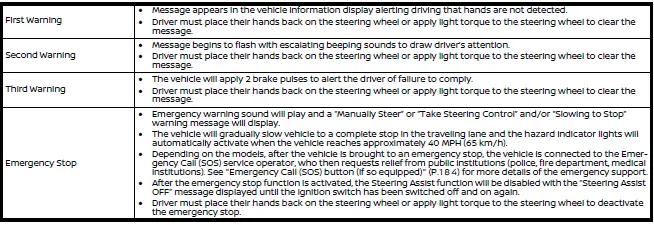
While operating in Hands On (green) mode, the Nissan Armada actively monitors steering input. If the driver fails to respond to escalating alerts, the system may initiate additional safety measures. It is always the driver’s responsibility to maintain proper control and keep hands on the steering wheel to avoid intervention.
 Steering Assist
Basic information
Steering Assist in the Nissan Armada is an integral component of the ProPILOT
Assist system, designed to enhance driving comfort and stability during highway
travel. Before usin ...
 Steering Assist with HD map data (a feature of ProPILOT Assist 2.1)
In the Nissan Armada equipped with ProPILOT Assist 2.1, Steering Assist is enhanced
by HD map data, enabling more advanced driving support. When all required conditions
are met, the system indicat ...
Other materials:
Liftgate Adjustment
Liftgate Adjustment
Callout
Component Name
1
Liftgate
Caution: Refer to Fastener Caution.
Procedure
Loosen the 4 liftgate hinge bolts to adjust the liftgate.
Adjust the liftgate in order to obtai ...
Tire and Wheel Assembly Runout Measurement - On-Vehicle
Raise and support the vehicle.
Closely inspect each tire for proper and even bead seating.
If any of the tire beads were not properly or evenly seated, reseat the
tire bead, then proceed to step 4. Refer to Tire and Wheel Removal and Installation.
Wrap the circumferenc ...
Settings
Basic information
The Settings mode in the Nissan Armada provides drivers with a comprehensive
interface for customizing both the vehicle information display and various system
configurations. Through this menu, users can tailor the Nissan Armada driving experience
according to personal prefe ...

0.0066