
Nissan Armada 2025-2026 Owner's Manual: How to enable/disable the systems
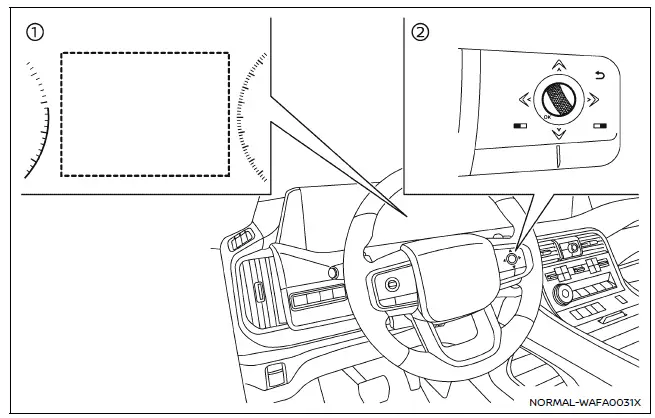
- Vehicle information display
- Steering-wheel-mounted controls (right side)
Basic information
In the Nissan Armada, a wide range of Driver Assistance systems can be easily customized through the vehicle information display. Using the steering-wheel-mounted controls, the driver can navigate through the settings menu and activate or deactivate specific features according to personal preference and driving conditions.
The following Nissan Armada systems (if so equipped) can be configured directly from the display using the scroll dial:
- Automatic Emergency Braking (AEB) with Pedestrian Detection
- Intelligent Forward Collision Warning (I-FCW)
- Lane Departure Warning (LDW)
- Intelligent Lane Intervention (I-LI)*
- Blind Spot Warning (BSW)
- Intelligent Blind Spot Intervention (I-BSI)*
- Steering Assist
- Rear Cross Traffic Alert (RCTA)
- Moving Object Detection (MOD)
- Sonar system
- Speed Limit Assist (ProPILOT Assist 1.1 and 2.1)
- Speed Adjust by Route (ProPILOT Assist 1.1 and 2.1)
- Traffic Sign Recognition (TSR)
- Intelligent Driver Alertness (I-DA)
- Lane Change Assist (ProPILOT Assist 2.1)
- Passing Assist (ProPILOT Assist 2.1)
*: To activate the Intelligent Lane Intervention (I-LI) and Intelligent Blind Spot Intervention (I-BSI) systems in the Nissan Armada, it is necessary to press the ProPILOT Assist switch after enabling these features in the settings menu.
Driver Assistance display
The Nissan Armada Driver Assistance display can be accessed through the vehicle information display or will appear temporarily when the ProPILOT Assist system is activated. This interface provides a clear overview of system status and functionality.
The operational condition of each Nissan Armada system is shown within dedicated display zones.
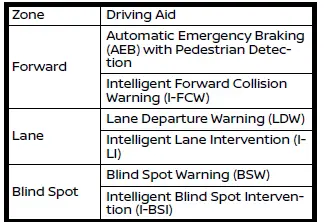
- When warning systems are active, the "
 "
symbol appears in the relevant zone.
"
symbol appears in the relevant zone. - When intervention systems are active, the "
 "
symbol is displayed.
"
symbol is displayed. - If no systems are enabled, "OFF" will be shown in each zone.
- If a yellow "
 "
or "
"
or "
 "
symbol flashes or remains illuminated, the corresponding Nissan Armada system
may be temporarily unavailable.
"
symbol flashes or remains illuminated, the corresponding Nissan Armada system
may be temporarily unavailable.
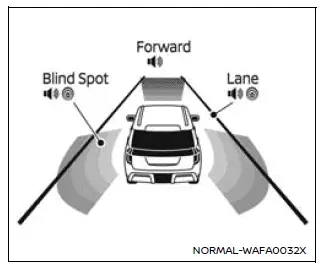
Example (all enabled)
Driver assistance troubleshooting guide
Basic information
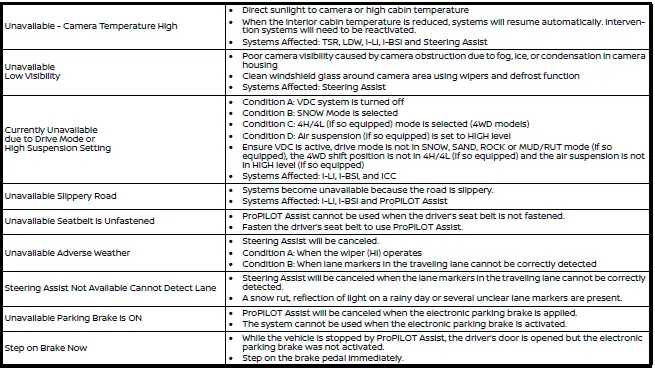
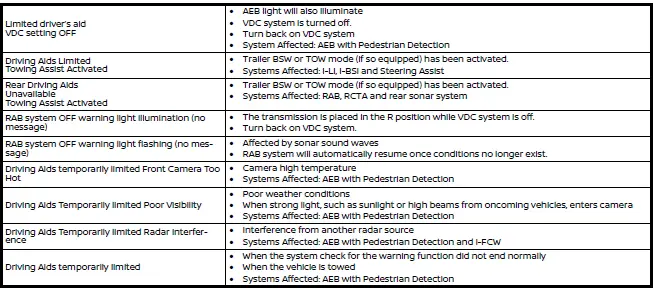
Many Nissan Armada Driver Assistance systems rely on shared components such as cameras, radar sensors, and sonar units. If a warning message appears or a system indicator flashes, it is important to evaluate the system conditions immediately.
For system temporarily unavailable
Before driving your Nissan Armada, ensure that all cameras, radar sensors, and sonar sensors are clean and unobstructed. Dirt, snow, damage, or extreme environmental conditions can significantly affect system performance.
Refer to the "Camera, radar and sonar locations" section for detailed positioning of these components.
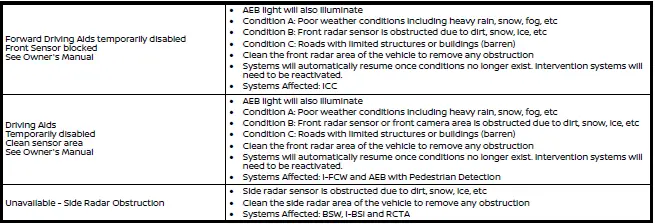
For system malfunction
If an orange warning indicator appears in your Nissan Armada, safely stop the vehicle, turn off the engine, and restart it. If the warning persists, it may indicate a system malfunction. In such cases, it is strongly recommended to have the Nissan Armada inspected by an authorized dealer.

Camera, radar and sonar locations
The Nissan Armada integrates multiple sensors located around the vehicle to support its advanced Driver Assistance systems. Proper maintenance of these components is essential for reliable operation.
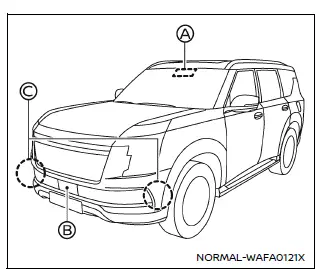
Example
Vehicle front
- Front camera unit
- Automatic Emergency Braking (AEB) with Pedestrian Detection
- Lane Departure Warning (LDW)
- Intelligent Lane Intervention (I-LI)
- Intelligent Blind Spot Intervention (I-BSI)
- Steering Assist (ProPILOT Assist)
- High beam assist
- Traffic Sign Recognition (TSR)
- Front radar sensor
- Automatic Emergency Braking (AEB)
- Intelligent Forward Collision Warning (I-FCW)
- Intelligent Cruise Control (ICC)
- Side radar sensor
- ProPILOT Assist 2.1
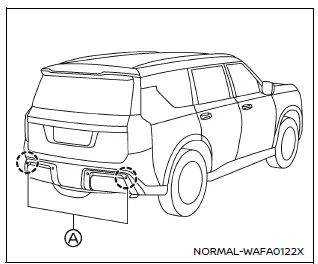
Example
Vehicle rear
- Side radar sensor
- Blind Spot Warning (BSW)
- Intelligent Blind Spot Intervention (I-BSI)
- Rear Cross Traffic Alert (RCTA)
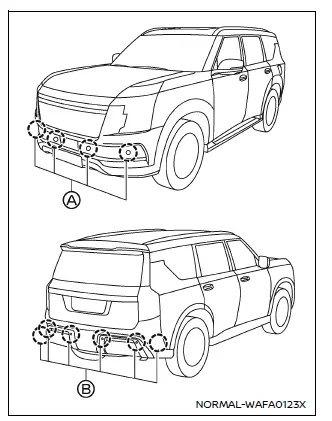
Example
- Front sonar sensors
- Sonar system
- ProPILOT Assist
- Rear sonar sensors
- Rear Automatic Braking (RAB)
- Sonar system
- ProPILOT Assist
The Nissan Armada Driver Assistance configuration system provides flexibility, allowing drivers to tailor safety technologies to their preferences while ensuring optimal functionality through proper maintenance and system awareness. :contentReference[oaicite:0]{index=0}
 Basic information
The Nissan Armada is equipped with a comprehensive suite of Driver Assistance
systems designed to support the driver in a wide range of driving situations. Each
system in the Nissan Armada works t ...

Other materials:
Towing the Vehicle
Notice: Incorrectly towing a disabled vehicle may cause damage. The
damage would not be covered by the vehicle warranty. Do not lash or hook to
the chassis components including the front and rear subframes, suspension control
arms and links during towing and recovery of a disabled vehicl ...
Steering Column Replacement
Removal Procedure
Caution: With wheels of the vehicle facing straight ahead,
secure the steering wheel utilizing steering column anti-rotation pin,
steering column lock, or a strap to prevent rotation. Locking of the
steering column will prevent damage and a possible ...
Steering Wheel Replacement
Steering Wheel Replacement
Callout
Component Name
Preliminary Procedure
Remove the inflatable restraint steering wheel module. Refer to
Airbag Steering Wheel Module Replacement.
Use paint in order to place match marks on ...

0.005