
Nissan Armada 2025-2026 Owner's Manual: How to enable/disable the TSR system
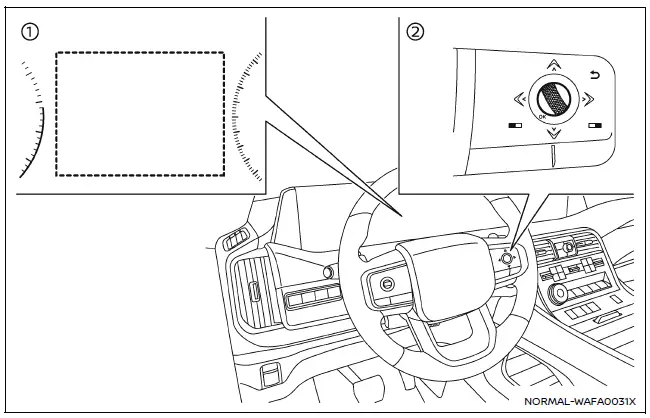
- Vehicle information display
- Steering-wheel-mounted controls (right side)
To configure the Nissan Armada TSR system, follow these steps:
1. Press the
 button until "Settings" appears on the vehicle information display. Then press the
scroll dial.
button until "Settings" appears on the vehicle information display. Then press the
scroll dial.
2. Navigate to "Driver Assistance" using the scroll dial and confirm selection.
3. Select "Traffic Sign Assist", then choose either "Speed Limit Sign" or "Speed Limit Warning" (if equipped). Toggle the desired setting ON or OFF using the scroll dial.
System temporarily unavailable
Under certain conditions, such as when the Nissan Armada is parked under direct sunlight in high temperatures (above approximately 104ºF / 40ºC), the TSR system may automatically deactivate. In this case, a warning message such as "Unavailable Camera Temperature High" will appear.
Action to take:
Once the interior temperature of the Nissan Armada decreases, the TSR system will resume normal operation automatically.
System malfunction
If the TSR system in the Nissan Armada detects a malfunction, it will deactivate automatically and display a "Malfunction See Owner's Manual" warning message.
Action to take:
If this message appears, safely stop the vehicle, turn off the engine, and restart it. If the warning persists, the Nissan Armada should be inspected by an authorized dealer.
System maintenance
The Nissan Armada TSR system shares its multi-sensing front camera with other driver assistance technologies such as Lane Departure Warning (LDW). This camera is mounted near the interior mirror and must be kept clean and unobstructed to ensure optimal system performance. Regular inspection and maintenance are essential for reliable operation of the Nissan Armada TSR system. :contentReference[oaicite:0]{index=0}
 System operation
The Nissan Armada TSR system is capable of recognizing and displaying key traffic
signs, including the following:
Latest detected speed limit
No passing zone indication
CAUTION
...

Other materials:
Rear Window Defogger Description and Operation
Rear Window Defogger System Components
The rear window defogger system consist of the following components:
The HVAC control module
The body control module (BCM)
The rear defogger relay
The rear window grid
Driver outside rearview mirror
Passenger outside rearview mirro ...
Front Side Door Window Regulator Motor Replacement
Front Side Door Window Regulator Motor Replacement
Callout
Component Name
Warning: Refer to Glass and Sheet Metal Handling Warning.
Preliminary Procedure
Remove the front side door window regulator. Front Side ...
Transmission Assemble (Gen 1)
Special Tools
3-9506289 Universal Adapter
R-0007758 Holding Fixture
S-9407197 Differential Rotating Tool
S-9407198 Differential Bearing Race Wrench
For equivalent regional tools, refer to Special Tools.
Install the clutch and differential housing assembly (1)
onto ...

0.0053