
Nissan Armada 2025-2026 Owner's Manual: I-BSI driving situations
Indicator on

Indicator off

Indicator flashing

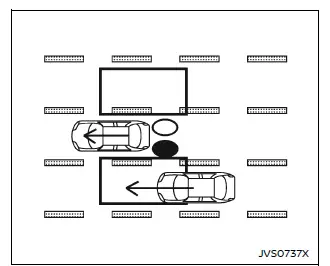
Illustration 1 - Approaching from behind
Another vehicle approaching from behind
Illustration 1: In the Nissan Armada, the side indicator light will illuminate when a vehicle enters the detection zone from the rear in an adjacent lane, helping the driver stay aware of surrounding traffic conditions.
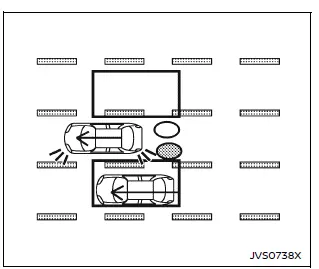
Illustration 2 - Approaching from behind
Illustration 2: When the driver of the Nissan Armada activates the turn signal while another vehicle is within the detection zone, the system emits two audible alerts, and both the side indicator and I-BSI warning indicators begin flashing to draw immediate attention.
NOTE:
If the turn signal in the Nissan Armada is activated before another vehicle enters the detection zone, the visual indicators will still flash; however, no audible warning will be emitted once the vehicle is detected.
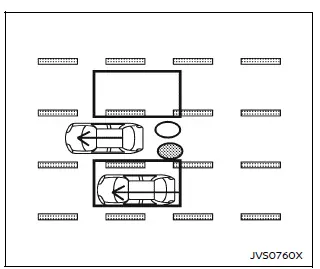
Illustration 3 - Approaching from behind
Illustration 3: When the Nissan Armada Intelligent Blind Spot Intervention (I-BSI) system is active and the vehicle begins to drift toward a lane marker while another vehicle is detected, the system issues three warning chimes and flashes the indicators. It then assists by gently steering the Nissan Armada back toward the center of the lane.
NOTE:
- The Nissan Armada radar sensors may not always detect vehicles approaching at very high speeds from behind.
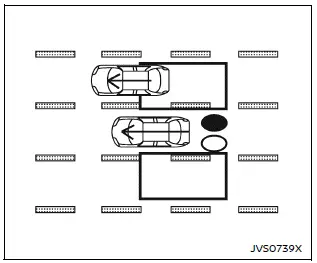
Illustration 4 - Overtaking another vehicle
Overtaking another vehicle
Illustration 4: When the Nissan Armada overtakes another vehicle and that vehicle remains within the detection zone for approximately three seconds, the side indicator light illuminates to notify the driver of its presence.
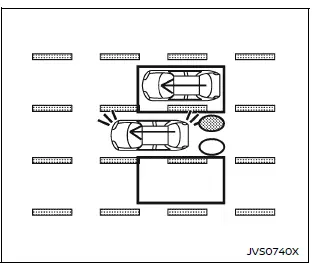
Illustration 5 - Overtaking another vehicle
Illustration 5: If the turn signal is activated while overtaking and another vehicle is still within the detection zone, the Nissan Armada system emits warning chimes and flashes both the side indicator and I-BSI indicator.
NOTE:
- If the driver activates the turn signal in the Nissan Armada before a vehicle enters the detection zone, the visual alerts will activate but no chime will sound once detection occurs.
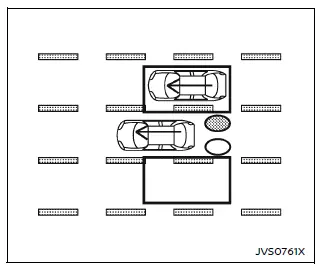
Illustration 6 - Overtaking another vehicle
Illustration 6: When the Nissan Armada I-BSI system is active and the vehicle approaches a lane marker while another vehicle remains nearby, the system issues three warning tones and automatically assists in guiding the vehicle back into its lane.
NOTE:
- When overtaking multiple vehicles in succession, the Nissan Armada system may not detect vehicles following closely behind the first one.
- Slower vehicles may not be detected if they are passed quickly by the Nissan Armada.
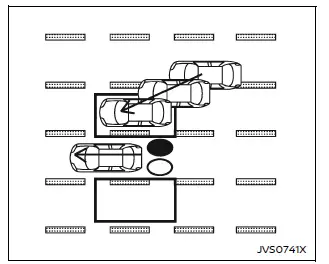
Illustration 7 - Entering from the side
Entering from the side
Illustration 7: The Nissan Armada system activates the side indicator light when a vehicle enters the detection zone from either side, enhancing driver awareness during lateral traffic movement.
NOTE:
The Nissan Armada radar sensors may not detect vehicles traveling at nearly the same speed when they enter the detection zone.
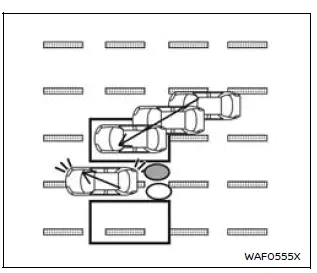
Illustration 8 - Entering from the side
Illustration 8: When the turn signal is engaged while another vehicle is within the detection zone, the Nissan Armada produces two audible alerts and flashes both the side and I-BSI indicators.
NOTE:
- If the turn signal is activated before a vehicle enters the detection zone, only visual alerts will occur in the Nissan Armada without an accompanying sound.
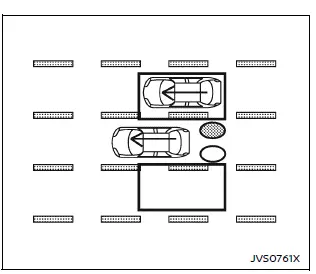
Illustration 9 - Entering from the side
Illustration 9: When the Nissan Armada approaches a lane boundary while another vehicle is detected, the system emits three warning chimes and assists in steering the vehicle back into the center of the lane.
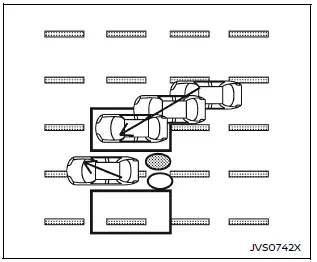
Illustration 10 - Entering from the side
Illustration 10: The Nissan Armada I-BSI system will not intervene if the vehicle is already positioned on a lane marker when another vehicle enters the detection zone. In this situation, only the Blind Spot Warning (BSW) system remains active.
NOTE:
- The Nissan Armada radar sensors may not detect vehicles moving at a similar speed when they enter the detection zone.
- The Nissan Armada Intelligent Blind Spot Intervention (I-BSI) may temporarily
stop active intervention and provide only warning alerts under the following
conditions:
- When the brake pedal is pressed.
- When acceleration is applied during system operation.
- During rapid steering inputs.
- When safety systems such as ICC, I-FCW, or AEB are active.
- When hazard warning lights are activated.
- When driving through curves at high speed.
The Nissan Armada I-BSI system enhances safety by actively supporting the driver during complex traffic situations, but it should always be used as an assistance feature rather than a replacement for attentive driving. :contentReference[oaicite:0]{index=0}
зроби сильний реврайт плюс маленьке доповнення англійською мовою, не міняй теги I-BSI system limitations
WARNING
The following limitations apply to the Nissan Armada Intelligent Blind Spot
Intervention (I-BSI) system. Failure to operate the vehicle within these limitations
may result in serious inju ...
 System temporarily unavailable
When any of the following messages appear on the vehicle information display,
a chime will sound and the I-BSI system will be turned off automatically.
"Unavailable Slippery Road": Whe ...
Other materials:
Additional Maintenance and Care
Your vehicle is an important investment and caring for it properly may help to
avoid future costly repairs. To maintain vehicle performance, additional maintenance
services may be required.
It is recommended that your dealer perform these services — their trained dealer
technicians know you ...
Front Side Door Outer Panel Replacement
Removal Procedure
Note: According to different corrosion warranties, only the regional
mandatory joining methods are allowed.
Disable the SIR System. Refer to SIR Disabling and Enabling.
Disconnect the negative battery cable. Refer to Battery Negative Cable
Disconn ...
Engine Coolant Thermostat Housing Removal
Caution: Refer to Engine Coolant Thermostat Housing Caution.
Remove the engine coolant thermostat housing retainer nut (4).
Remove the engine coolant thermostat housing retainer (1).
Remove the 4 engine coolant thermostat housing bolts (3).
Remo ...

0.0056