
Chevrolet Sonic Repair Manual: Instrument Panel Upper Trim Panel Replacement - Right Side
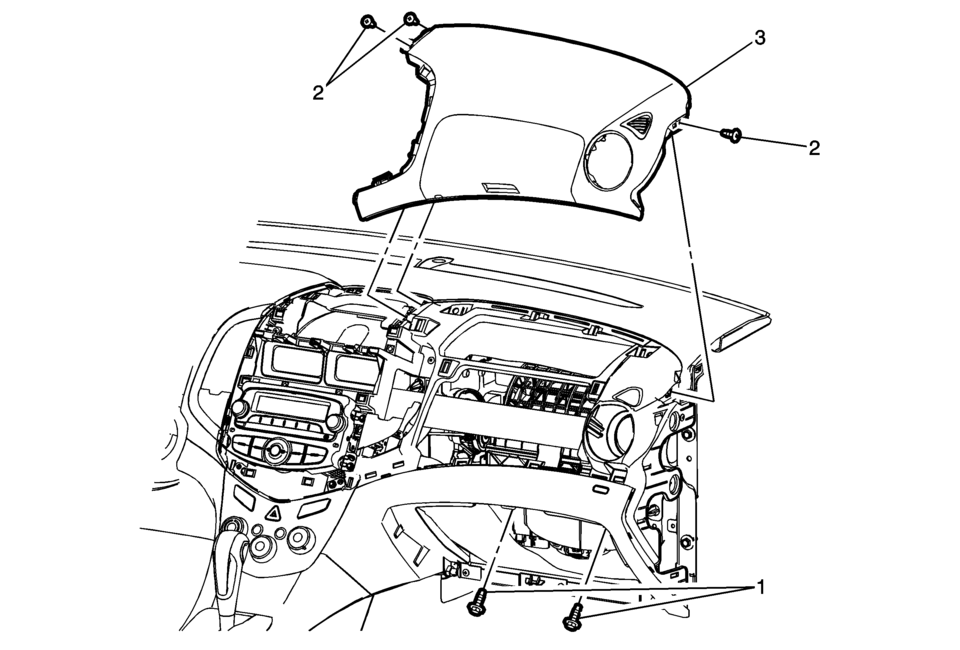
|
Callout |
Component Name |
|---|---|
Preliminary Procedure
|
|
|
1 |
Instrument Panel Inflatable Restraint Module Fasteners (Qty:?€‰2) Caution: Refer to Fastener Caution.
10Y 89?€‰lb?€‰in |
|
2 |
Instrument Panel Upper Trim Panel Fastener (Qty:?€‰3) |
|
3 |
Instrument Panel Upper Trim Panel Procedures
|
 Instrument Panel Upper Trim Panel Replacement - Left Side
Instrument Panel Upper Trim Panel Replacement - Left Side
Callout
Component Name
Preliminary Procedure
Remove the instrument cluste ...
 Cup Holders
...
Other materials:
Charging System Light
This light will come on briefly when the ignition is turned on, and the engine
is not running, as a check to show it is working.
It should go out when the engine is started. If it stays on, or comes on while
driving, there may be a problem with the electrical charging system. Have it checked ...
MOD system operation
The Nissan Armada MOD system activates automatically under the following conditions:
When the transmission is shifted into R (Reverse).
When the CAMERA/
button is pressed to enable the Around View Monitor display.
When the Nissan Armada vehicle speed drops below approximately 5 MPH (8 ...
System temporarily unavailable
While operating the Nissan Armada, certain road environments such as winding
mountain routes, steep inclines, sharp curves, narrow lanes, or areas under construction
can temporarily affect the performance of the driver assistance systems. In these
situations, the sensors may incorrectly id ...

0.0083