
Chevrolet Sonic Owner's Manual: Detecting the Vehicle Ahead

The green vehicle ahead indicator will appear when a vehicle is detected ahead. Whenever this indicator does not appear, FCA will not respond. The indicator may disappear on curves, highway exit ramps, or hills, or due to poor visibility. The FCA system will not detect another vehicle ahead until it is completely in the driving lane.
Warning
FCA does not provide a warning to help avoid a crash, unless it detects a vehicle. FCA may not detect a vehicle ahead if the FCA sensor is blocked by dirt, snow, or ice, or if the windshield is damaged. It may also not detect a vehicle on winding or hilly roads, or in conditions that can limit visibility such as fog, rain, or snow, or if the headlamps or windshield are not cleaned or in proper condition. Keep the windshield, headlamps, and FCA sensors clean and in good repair.
Collision Alert
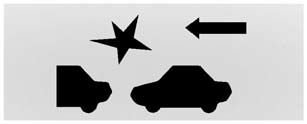
When your vehicle approaches another vehicle too rapidly, the red FCA display will flash and sound several beeps. When this occurs, the brake system prepares for driver braking to occur more rapidly. Continue to apply the brake pedal as the driving situation dictates.
Tailgating Alert
The red FCA display will stay continuously illuminated when you are following a vehicle ahead much too closely.
 Forward Collision Alert (FCA) System
For vehicles with this feature, read the following section before using it.
The Forward Collision Alert (FCA) system may help to avoid or reduce the harm
caused by front-end crashes. FCA provides a ...
 Selecting the Alert Timing
The Collision Alert control is on the steering wheel. Press COLLISION ALERT to
set the alert timing to far, medium, near or off. The first button press shows the
current control setting on the D ...
Other materials:
Rear Side Door Window Replacement (Hatchback)
Rear Side Door Window Replacement
Callout
Component Name
Warning: Refer to Glass and Sheet Metal Handling Warning.
Preliminary Procedures
Remove the rear side door trim panel. Refer to Rear Side Door Trim
...
Front Side Door Window Switch Bezel Replacement (Right Side)
Front Side Door Window Switch Bezel Replacement
Callout
Component Name
Preliminary Procedure
Remove the front side door trim. Refer to Front Side Door Trim Replacement.
1
Front Side Door Window S ...
Pretensioner Handling and Scrapping
Scrapping Procedure
During the course of a vehicles useful life, certain situations may arise
which will necessitate the disposal of a live (undeployed) pretensioner. The
following information covers the proper procedures for the disposing of a live
(undeployed) pretensioner. Deplo ...

0.0063