
Chevrolet Sonic Owner's Manual: Mirror Adjustment
Exterior Mirrors
Manual Outside Mirrors
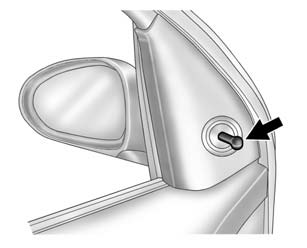
Move the control up, down, or side to side to adjust the mirror.
See Manual Mirrors.
Power Outside Mirrors
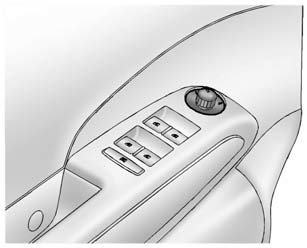
For vehicles with power outside mirrors:
1. Select the mirror by moving the selector switch to L for the driver side or R for the passenger side.
2. Use the control knob to move the mirror in the desired direction.
See Power Mirrors.
Interior Mirror
Hold the inside rearview mirror in the center to move it for a clearer view behind your vehicle. Adjust the mirror to avoid glare from the headlamps behind you. Push the tab forward for daytime use and pull it for nighttime use.
See Manual Rearview Mirror.
 Passenger Sensing System
United States
Canada
The passenger sensing system turns off the front outboard passenger frontal airbag
and knee airbag (if equipped) under certain conditions. No other airbag is affected
by ...
 Steering Wheel Adjustment
To adjust the steering wheel:
1. Pull the lever down.
2. Move the steering wheel up, down, forward, and backward.
3. Pull the lever up to lock the steering wheel in place.
Do not adjust the stee ...
Other materials:
Instrument Panel Accessory Bezel Package Installation
Installation Instructions Part Number
95205543
Kit Contents
Qty
Description
1
Molding Assembly - I/P Center Upper
1
Molding Assembly - I/P Center
1
Bezel Assembly - ...
Transmission Fluid Drain and Fill
Draining Procedure
Note:
The fluid check bolt at the front of the transmission may not be
opened.
The transmission fluid drained out during the pre-delivery inspection
may be re-used. New transmission fluid must be used during servicing
work.
The transmis ...
System maintenance (ProPILOT Assist 2.1)
To ensure optimal performance of the Nissan Armada ProPILOT Assist 2.1 system,
it is essential to keep the driver monitor area clean and unobstructed at all times.
Carefully remove any dust, dirt, or smudges using a clean, soft cloth such as
a lens-cleaning cloth. Maintaining a clear camera ...

0.0074