
Nissan Armada 2025-2026 Owner's Manual: Outside mirrors
Basic information
WARNING
Objects reflected in the passenger-side outside mirror of the Nissan Armada may appear farther away than they actually are. Always exercise caution when changing lanes to the right. Relying solely on the mirror can lead to misjudgment and potential accidents. For maximum safety, also use the inside mirror and perform a shoulder check to accurately assess surrounding traffic.
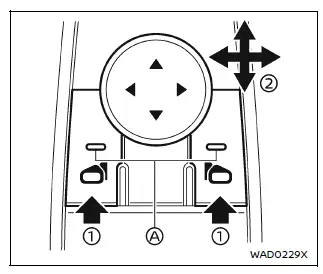
Adjusting outside mirrors
The Nissan Armada outside mirror adjustment controls are conveniently located on the driver’s armrest for easy access.
The mirrors can be adjusted when the ignition switch is in the ON or Auto ACC position, ensuring flexibility during setup before driving.
Press the selector switch to choose either the left or right mirror 1 (the corresponding indicator light A will illuminate), then use the control pad 2 to precisely position the mirror for optimal visibility.
Proper adjustment of Nissan Armada mirrors is essential for safe driving and minimizing blind spots.
Defrosting outside mirrors (if so equipped)
The Nissan Armada outside mirrors are equipped with a heating function that activates simultaneously with the rear window defroster.
This feature helps clear frost, ice, or condensation, improving visibility in cold or humid weather conditions.
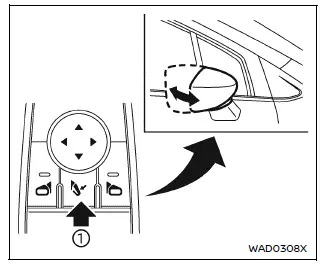
Example
Foldable outside mirrors
Remote control type:
The Nissan Armada power-folding mirrors can be conveniently operated using the mirror folding switch when the ignition is in the ON or Auto ACC position.
Press the folding switch 1 to automatically fold both mirrors inward. Press the switch again to unfold them back to their normal driving position.
WARNING
Never drive the Nissan Armada with the mirrors folded.
Reduced rear visibility may lead to dangerous driving situations or accidents.
CAUTION
- Avoid repeatedly folding and unfolding the Nissan Armada mirrors in quick succession, as this may temporarily disable the system.
- Do not touch the mirrors while they are moving, as this may result in injury or system malfunction.
- If the Nissan Armada mirrors are manually adjusted, they may not return to the correct position automatically. Always readjust them using the electronic controls before driving.
Automatic fold (if so equipped):
The Nissan Armada mirrors can automatically fold when the vehicle is locked using the Intelligent Key or request switch.
They will automatically unfold when the doors are unlocked or when the ignition switch is turned ON, enhancing convenience and vehicle protection.
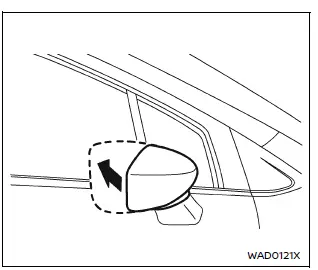
Manual control type:
For Nissan Armada models equipped with manual folding mirrors, simply push the mirror housing toward the rear of the vehicle to fold it.
Reverse tilt-down feature (if so equipped)
When reversing the Nissan Armada, the outside mirrors can automatically tilt downward to provide a better view of the ground and rear surroundings.
1. Turn the ignition switch to the ON position.
2. Shift the transmission into R (Reverse).
3. Select either the left or right mirror.
4. The selected Nissan Armada mirror will tilt downward automatically.
The mirrors will return to their original position when:
- The gear selector is moved out of R (Reverse).
- No mirror is selected.
- The ignition switch is turned OFF.
To deactivate this function, ensure that neither mirror is selected.
The Nissan Armada reverse tilt position can also be customized. While in reverse, adjust the mirror to your preferred angle. The system will store this setting for future use.
Additionally, this customized position can be linked to a memory seat profile. After adjustment, return the vehicle to Park, press the SET button, and then press memory button (1 or 2) to save the configuration.
Automatic anti-glare (if so equipped)
The Nissan Armada driver-side outside mirror includes an automatic anti-glare function that adjusts reflectivity based on the brightness of headlights from vehicles behind.
This system activates automatically when the ignition is turned ON, improving nighttime driving comfort and safety.
Vanity mirror
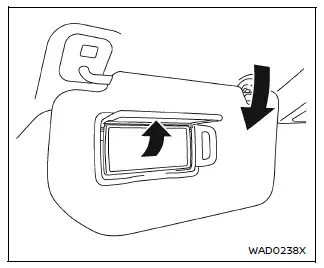
To use the Nissan Armada vanity mirror, lower the sun visor and lift the protective cover to reveal the mirror surface.
This convenient feature allows drivers and passengers to quickly check their appearance while maintaining comfort inside the Nissan Armada cabin.
 Inside mirror
Basic information
In the Nissan Armada, adjust the inside mirror by carefully setting both its
height and angle to achieve optimal rearward visibility and driving comfort.
Manual anti-glar ...
 Memory seat
Basic information
The Nissan Armada memory seat system is designed to enhance comfort and personalization
by allowing drivers to store and recall their preferred driving positions effortlessly.
Th ...
Other materials:
USB Port
The USB Port, if equipped, is in the storage area to the right of the infotainment
system. See Overview (Radio with Touchscreen) or Overview (AM-FM Radio) or Overview (Radio with CD/USB).
Portable devices are controlled by using the menu system described in Operation.
1. 3.5mm (1/8 ...
Rear Side Door Check Link Replacement
Rear Side Door Check Link Replacement
Callout
Component Name
Preliminary Procedures
Move the window to the full up position.
Remove the rear side door trim panel. Refer to Rear Side Door Trim
Replacement
...
Jump Starting
For more information about the vehicle battery, see Battery.
If the battery has run down, try to use another vehicle and some jumper cables
to start your vehicle. Be sure to use the following steps to do it safely.
Warning: Batteries can hurt you. They can be dangerous because:
The ...

0.0064