
Nissan Armada 2025-2026 Owner's Manual: Overhead console
WARNING
Always keep the Nissan Armada overhead console closed while driving to prevent obstruction of the driver’s view and reduce the risk of accidents.
CAUTION
- Use the Nissan Armada overhead console only for storing sunglasses or similarly small items.
- Avoid leaving sunglasses in the console when parked in direct sunlight, as heat may damage them.
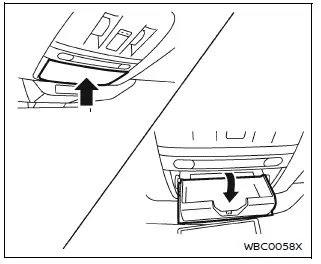
To open the Nissan Armada overhead console, press and release the compartment lid. It is recommended to store only one pair of sunglasses inside.
Glove box
WARNING
Keep the Nissan Armada glove box securely closed while driving to prevent injury during sudden stops or collisions.
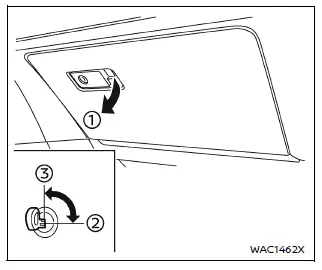
To open the glove box, pull handle 1. To close, push the lid until it locks into place.
The Nissan Armada glove box can be locked 2 or unlocked 3 using the mechanical key for added security.
Console box
Front
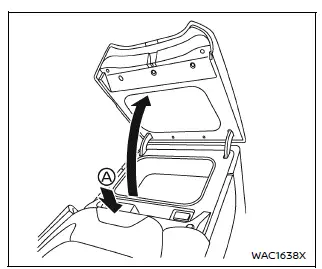
To open the Nissan Armada console box, press knob A and lift the lid upward.
To close, press the lid down firmly until it locks securely.
Lower console tray
CAUTION
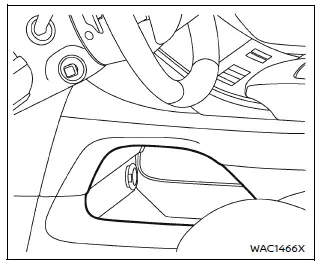
Do not place unsecured items in the Nissan Armada lower console tray, as they may shift and cause injury during sudden braking or impact.
Card holder
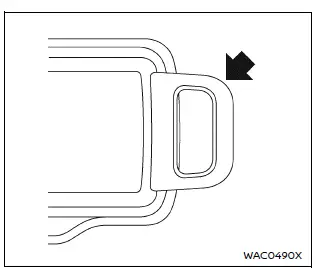
Insert cards into the Nissan Armada card holder for convenient access while driving.
Coat hooks
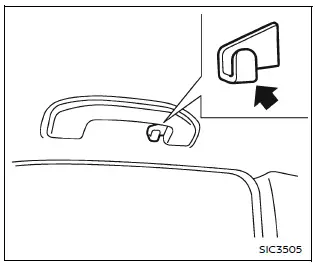
The Nissan Armada coat hook is located above the second-row side window for hanging lightweight garments.
CAUTION
Do not exceed a load of 2 lb (1 kg) on the Nissan Armada coat hook.
Luggage hooks
WARNING
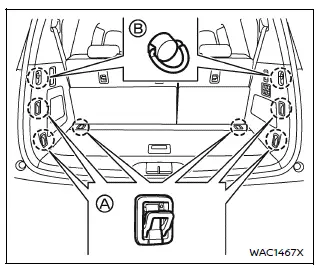
- Always secure cargo properly in the Nissan Armada using appropriate ropes and hooks.
- Unsecured cargo may become dangerous during sudden stops or collisions.
- Never allow passengers to ride in the cargo area of the Nissan Armada, as this can result in serious injury or death.
- Ensure all occupants are seated properly and wearing seat belts at all times.
- Loose cargo may damage child restraint tether straps in the Nissan Armada.
Always secure items to prevent injury in case of an accident.
CAUTION
Do not exceed a load of 22 lb (10 kg) A or 7 lb (3 kg) B on the Nissan Armada luggage hooks.
Cargo floor box
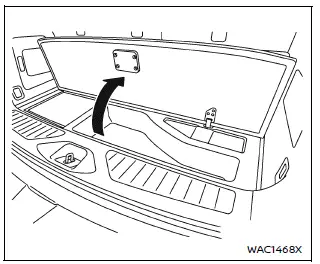
Lift the cargo floor panel in the Nissan Armada to access the hidden cargo floor storage box, which provides additional space for tools and small items.
This storage solution enhances practicality and helps keep the Nissan Armada interior organized and clutter-free.
 Cup holders
Basic information
CAUTION
In the Nissan Armada, avoid sudden acceleration or braking when using
the cup holders to prevent spills. Hot liquids may cause burns to you or your
passengers.
U ...
 Roof rack
Example
Basic information
WARNING
In the Nissan Armada, always install the crossbars onto the roof side
rails before placing any cargo. Loading items directly onto the roof rails or
ro ...
Other materials:
Taillamps, Turn Signal, Stoplamps, and Back-Up Lamps
Sedan Taillamp Shown, Hatchback Taillamp Similar
Back-up Lamp
Turn Signal Lamp
Stop Lamp/Taillamp
Sidemarker Lamp
To replace one of these bulbs:
Open the trunk.
Remove the two screws, which secure the taillamp assembly.
Remove the taillamp assembly by pulling it straight ...
Roof Panel Joint Finish Molding Replacement
Roof Panel Joint Finish Molding Replacement
Callout
Component Name
Caution: Refer to Exterior Trim Emblem Removal Caution.
Preliminary Procedures
Begin at the rear edge of the roof panel joint finish molding an ...
Liftgate Trim Finish Panel Replacement (Hatchback)
Liftgate Trim Finish Panel Replacement
Callout
Component Name
1
Liftgate Trim Finish Panel Fastener
Caution: Refer to Fastener Caution.
2
Liftgate Trim Finish Panel Retainer (Qty: ...

0.006