
Chevrolet Sonic Repair Manual: Radio Rear Side Door Speaker Replacement
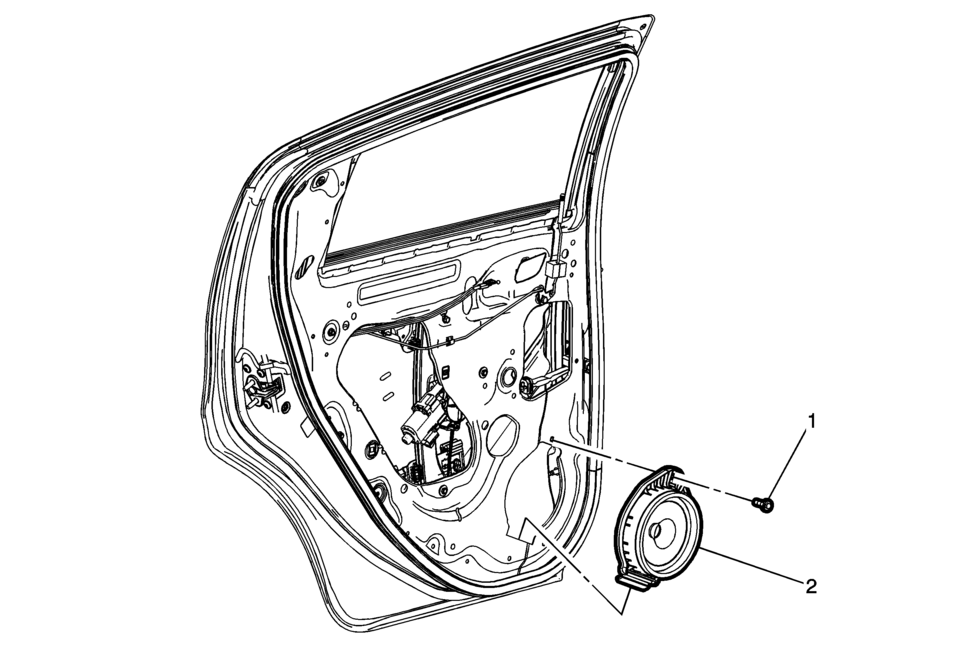
|
Callout |
Component Name |
|---|---|
|
Preliminary Procedure
Remove the rear side door trim. Refer to Rear Side Door Trim Replacement. |
|
|
1 |
Radio Rear Side Door Speaker Bolt Caution: Refer to Fastener Caution. |
|
2 |
Radio Rear Side Door Speaker Procedure
Disconnect the electrical connectors. |
 Radio Programming and Setup
Note:
DO NOT program a control module unless directed to by a service procedure
or a service bulletin. If the ECU is not properly configured with the correct
calibration software, th ...
 Radio Replacement (With US8)
Radio Replacement
Callout
Component Name
Preliminary Procedure
Remove the instrument panel center molding. Refer to
Instrume ...
Other materials:
Front Floor Console Multifunction Switch Replacement
Front Floor Console Multifunction Switch Replacement
Callout
Component Name
Preliminary Procedure
Remove the front floor console. Refer to Front Floor Console Replacement
1
Accessory Switch
...
Front Fog Lamp Package Installation
Installation Instructions Part Number
95950443
d2.50.5nm(220.5nmlbin)
d2.5nm(22lbin)(220.5nmlbin)
<aiiregionsexceptgmna,southamericaandaustraia>https://sporef.gm.com/weblogic/sporef/verifygplda ...
Park - Engine Running (Gen 2)
When the gear selector lever is in the Park (P) position, fluid is drawn into
the pump through the transmission fluid filter assembly. Line pressure is then directed
to the following valves:
Fluid Pressure Directed in Preparation for a Shift
Manual Valve
Mechanically controlled by ...

0.0078