
Chevrolet Sonic Repair Manual: Radio Replacement (Without US8)
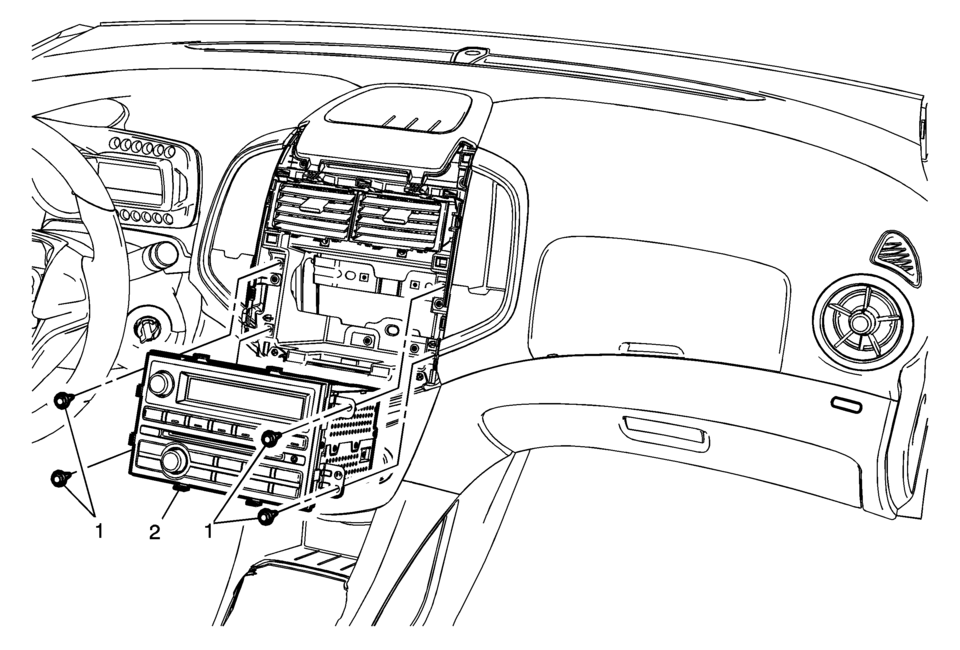
|
Callout |
Component Name |
|---|---|
|
Preliminary Procedure
Remove the instrument panel center molding. Refer to Instrument Panel Center Molding Replacement. |
|
|
1 |
Radio Bolts (Qty: 4) Caution: Refer to Fastener Caution. |
|
2 |
Radio Assembly Procedure
|
 Radio Replacement (With US8)
Radio Replacement
Callout
Component Name
Preliminary Procedure
Remove the instrument panel center molding. Refer to
Instrume ...
 Radio Windshield Side Garnish Molding Speaker Replacement
Radio Windshield Side Garnish Molding Speaker Replacement
Callout
Component Name
Preliminary Procedure
Remove the windshield si ...
Other materials:
Interior Lighting
Dome Lamps
The dome lamp controls are in the headliner above the rear seats.
: Press to turn the lamps off, even
when a door is open.
: When the button is returned to
the middle position, the lamps turn on automatically when a door is opened.
: Press to turn on the dome lamps.
Reading ...
Fuel Tank Replacement
Removal Procedure
Disconnect the battery negative cable. Refer to Battery Negative Cable
Disconnection and Connection.
Relieve the fuel pressure. Refer to Fuel Pressure Relief.
Drain the fuel Tank. Refer to Fuel Tank Draining.
Lift and support the vehicle. Refer to Lifti ...
Torque Converter Fluid Seal Replacement
Torque Converter Fluid Seal Replacement
Callout
Component Name
1
Torque Converter Fluid Seal Retainer
2
Torque Converter Fluid Seal
Special Tools
DT-47791-A Seal Installer
DT-6125- ...

0.0146