
Nissan Armada 2025-2026 Owner's Manual: Rear-facing child restraint installation using the seat belts
WARNING
- When installing a rear-facing child restraint in the Nissan Armada, the
three-point seat belt must be switched to Automatic Locking Retractor (ALR)
mode.
Failure to activate ALR mode may result in the child restraint not being securely fixed. This could cause the seat to shift, tip, or loosen, increasing the risk of injury to the child during sudden braking or a collision. Additionally, improper installation may affect the operation of the front passenger air bag system in the Nissan Armada.
- When installing a child restraint in the 3rd row center seat of the Nissan Armada, both the center seat belt connector tongue and the buckle tongue must be properly fastened to ensure full restraint system functionality.
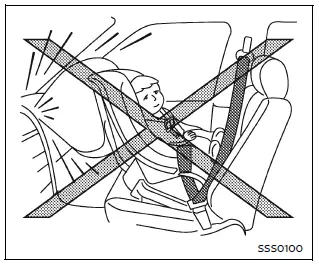
Rear-facing - step 1
Do not use the LATCH lower anchors in the Nissan Armada if the combined weight of the child and the child restraint exceeds 65 lbs (29.5 kg). In such cases, always use the vehicle’s seat belt system for installation. Carefully follow the instructions provided by the child restraint manufacturer.
Follow these steps to correctly install a rear-facing child restraint using seat belts in the Nissan Armada:
1. Rear-facing child restraints must always be installed in the rear seating area of the Nissan Armada and must never be used in the front seat. Place the child restraint securely on the seat and position it according to the manufacturer’s instructions.
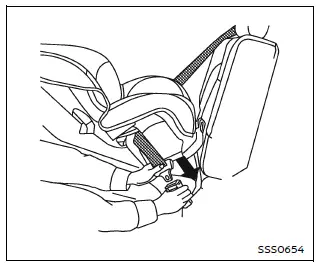
Rear-facing - step 2
2. Route the seat belt through the designated belt path of the child restraint, then insert the tongue into the buckle until it clicks securely into place. Ensure proper routing as specified by the child restraint manufacturer.
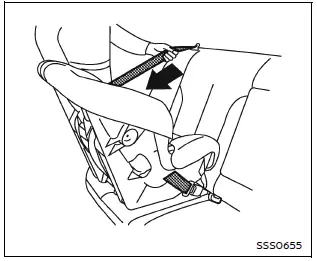
Rear-facing - step 3
3. Pull the shoulder belt all the way out until it is fully extended. This action activates the Automatic Locking Retractor (ALR) mode in the Nissan Armada. The system will return to Emergency Locking Retractor (ELR) mode once the belt is fully retracted.
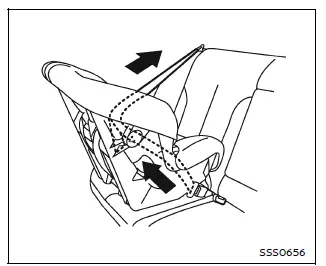
Rear-facing - step 4
4. Allow the seat belt to retract while guiding it back. Pull upward on the shoulder portion to remove any slack and ensure a tight fit.
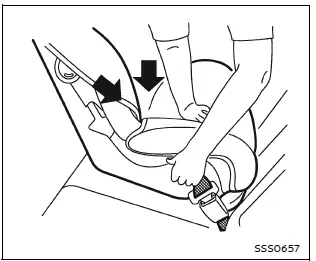
Rear-facing - step 5
5. Apply firm downward and rearward pressure on the center of the child restraint while tightening the belt. This compresses the seat cushion and ensures a secure installation in the Nissan Armada.
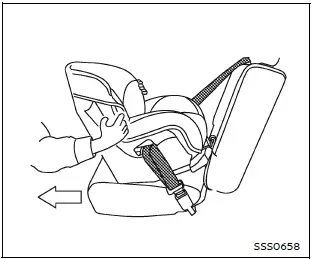
Rear-facing - step 6
6. After installation, test the child restraint thoroughly before placing the child inside. Hold the restraint near the belt path and attempt to move it side to side.
The child restraint should not move more than 1 inch (25 mm). Also pull it forward to confirm that the seat belt holds it firmly in place.
If the restraint is not secure, tighten the seat belt further or reposition it in another seating location within the Nissan Armada. You may also need to try a different child restraint, as not all models are compatible with every vehicle.
7. Before every trip in the Nissan Armada, verify that the child restraint is properly secured. If the belt is not locked or the seat feels loose, repeat the installation steps.
Once the child restraint is removed and the seat belt is fully retracted, the ALR mode is automatically canceled and the system returns to normal operation.
This installation method ensures that the Nissan Armada provides maximum safety for infants by combining proper restraint techniques with advanced seat belt technology.
 Rear-facing child restraint installation using LATCH
Before installing a child restraint in the Nissan Armada, carefully review all
warnings and precautions provided in the "Child safety" and "Child restraints" sections
of this m ...
 Forward-facing child restraint installation using LATCH
Before installing a forward-facing child restraint in the Nissan Armada, carefully
review all Warnings and Cautions provided in the "Child safety" and "Child restraints"
sectio ...
Other materials:
Front Disc Brake Pads Replacement
Removal Procedure
Warning: Refer to Brake Dust Warning.
Note: Always replace disc brake pads in axle sets.
Inspect the fluid level in the brake master cylinder reservoir.
If the brake fluid level is midway between the maximum-full point and
the minimum allowab ...
Gears Cleaning and Inspection (Gen 1)
Gears
Warning: Wear safety glasses to avoid injury when using compressed
air or any cleaning solvent. Bodily injury may occur if fumes are inhaled
or if skin is exposed to chemicals.
Clean the following gears in a suitable solvent and
air dry all the p ...
System temporarily unavailable
When any of the following messages appear on the vehicle information display,
a chime will sound and the I-BSI system will be turned off automatically.
"Unavailable Slippery Road": When the VDC system (except traction control
system function) or ABS operates.
"Currently Una ...

0.0095