
Nissan Armada 2025-2026 Owner's Manual: Rear-facing child restraint installation using LATCH
Before installing a child restraint in the Nissan Armada, carefully review all warnings and precautions provided in the "Child safety" and "Child restraints" sections of this manual.
Do not use the LATCH lower anchors if the combined weight of the child and the child restraint exceeds 65 lbs (29.5 kg). In such cases, the child restraint must be installed using the vehicle’s seat belt instead. Always follow the instructions provided by the child restraint manufacturer when installing in the Nissan Armada.
Follow these steps to install a rear-facing child restraint in the 2nd row seats of the Nissan Armada using the LATCH system:
1. Position the child restraint securely on the seat in the Nissan Armada.
Always follow the instructions supplied by the child restraint manufacturer for correct placement.
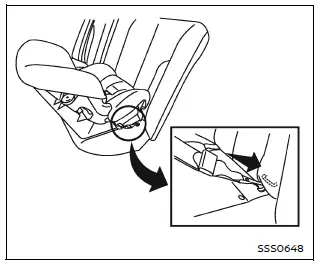
Rear-facing web-mounted - step 2
2. Attach the child restraint connectors to the LATCH lower anchors. Ensure that each attachment is properly engaged and securely fastened.
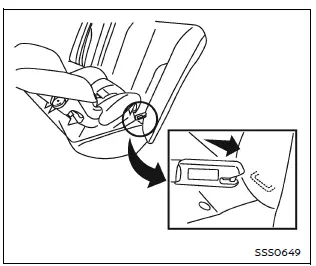
Rear-facing rigid-mounted - step 2
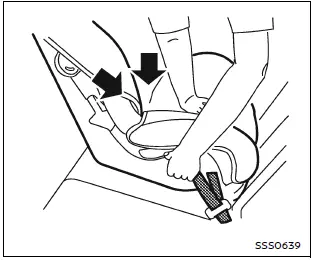
Rear-facing - step 3
3. For child restraints equipped with webbing-mounted attachments, remove any slack by pressing firmly downward and rearward on the child restraint. This compresses the seat cushion and ensures a tighter, more secure fit in the Nissan Armada.
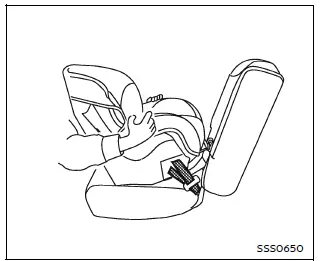
Rear-facing - step 4
4. After installation, test the stability of the child restraint before placing the child inside. Hold the restraint near the LATCH attachment points and attempt to move it side to side.
The child restraint should not move more than 1 inch (25 mm). Also pull it forward to ensure the anchors are holding securely.
If the restraint is not stable, tighten the attachments or try a different seating position in the Nissan Armada. If necessary, install the restraint using the vehicle seat belt instead.
Keep in mind that not all child restraint systems fit all vehicles perfectly, including the Nissan Armada.
5. Before each use, verify that the child restraint is securely installed. If any looseness is detected, repeat the installation steps to ensure maximum safety.
Proper installation of child restraints in the Nissan Armada is essential for protecting young passengers and ensuring safe travel under all driving conditions.
 Top tether anchor
2nd row captain's seat
2nd row bench seat
3rd row seat
Basic information
The Nissan Armada is equipped with dedicated top tether anchor points designed
to enhance child restraint ...
 Rear-facing child restraint installation using the seat belts
WARNING
When installing a rear-facing child restraint in the Nissan Armada, the
three-point seat belt must be switched to Automatic Locking Retractor (ALR)
mode.
Failure to activate ALR ...
Other materials:
Special Tools
Illustration
Tool Number/Description
EL–50334–20
Multi-Media Interface Tester (MIT)
EL–50334–50
USB Cable and Adapter Kit
EL-48028
Digital Radio Test ...
Steering Linkage Inner Tie Rod Replacement
Steering Linkage Inner Tie Rod Replacement
Callout
Component Name
Preliminary Procedures
Raise and support the vehicle. Refer to Lifting and Jacking the
Vehicle.
Remove the steering gear boot. Refer to Steering Gear Boot ...
Input and Output Speed Sensor Removal
Input and Output Speed Sensor Removal
Callout
Component Name
1
A/Trans Output Speed Sensor Bolt M6 x 18 (Qty: 1)
2
A/Trans Output Speed Sensor Assembly
...

0.0052