
Chevrolet Sonic Repair Manual: Rear Side Door Trim Replacement (Sedan)
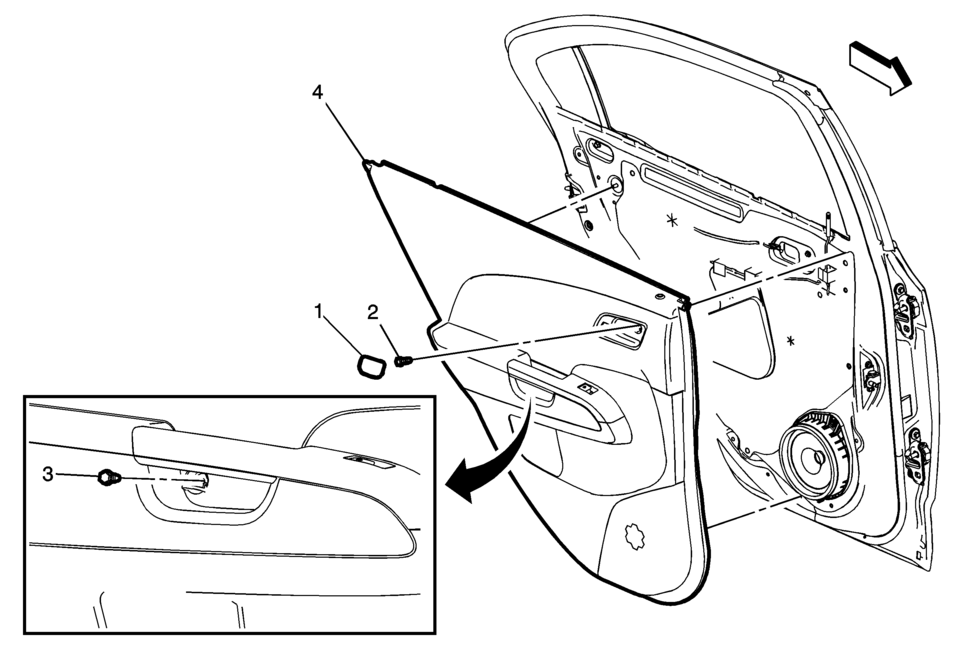
|
Callout |
Component Name |
|---|---|
|
1 |
Rear Side Door Inside Handle Bolt Cap |
|
2 |
Rear Side Door Inside Handle Fastener Caution: Refer to Fastener Caution. Procedure
Pull handle back to remove cap. Use suitable tool to unsnap. |
|
3 |
Rear Side Door Trim Fastener Procedure
Use a small flat-bladed tool to open the rear side door trim integral cap to access the fastener. |
|
4 |
Rear Side Door Trim Assembly Procedure
|
 Rear Side Door Trim Replacement (Hatchback)
Rear Side Door Trim Replacement
Callout
Component Name
Preliminary Procedure
Remove the rear side door upper rear trim panel. R ...
 Rear Side Door Upper Front Auxiliary Weatherstrip Retainer Replacement
Rear Side Door Upper Front Auxiliary Weatherstrip Retainer Replacement
Callout
Component Name
1
Front Side Door Upper Fr ...
Other materials:
Rear Brake Hose Replacement (Body to Axle - Drum Brake)
Removal Procedure
Warning: Refer to Brake Dust Warning.
Warning: Refer to Brake Fluid Irritant Warning.
Raise and support the vehicle. Refer to Lifting and Jacking the Vehicle.
Remove the tire and wheel assembly. Refer to Tire and Wheel Removal
and Install ...
Heater Inlet Hose Replacement (LUV)
Heater Inlet Hose Replacement
Callout
Component Name
Preliminary Procedures
Drain the engine coolant. Refer to Cooling System Draining and Filling.
Remove the charge air cooler outlet hose. Refer to Charge Air Cooler
...
If your vehicle overheats
CAUTION
Never continue driving your Nissan Armada if the engine temperature rises
excessively. Doing so may result in severe engine damage or even a vehicle fire.
To prevent burns, never remove the radiator cap or coolant reservoir
cap while the Nissan Armada engine is hot. Pressurized h ...

0.0083