
Chevrolet Sonic Repair Manual: Rear Side Door Window Regulator Motor Replacement
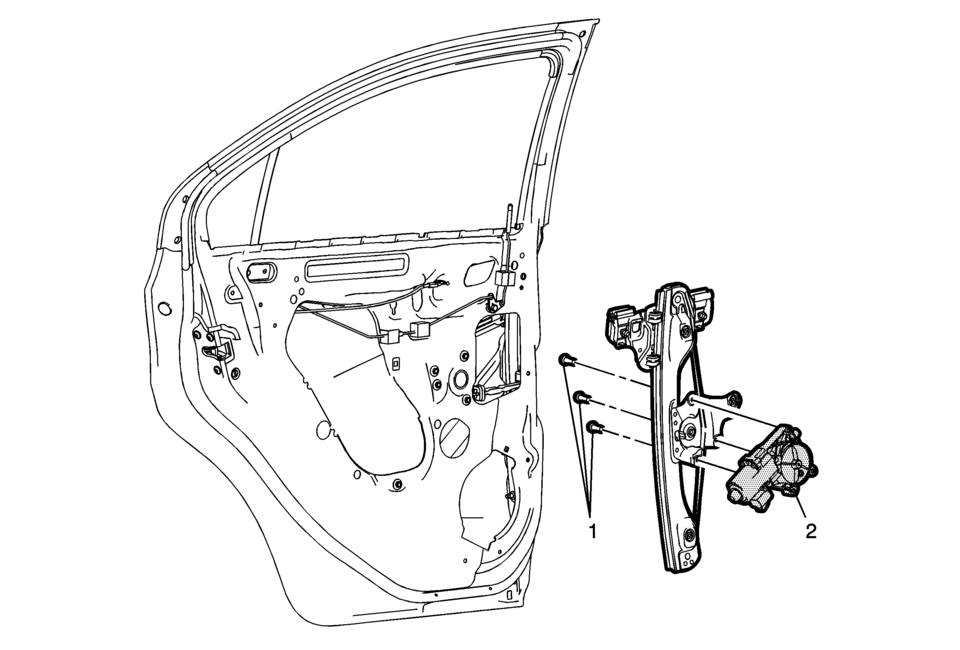
|
Callout |
Component Name |
|---|---|
|
Warning: Refer to Glass and Sheet Metal Handling Warning. Preliminary Procedure
Remove the rear side door window regulator. Refer to Rear Side Door Window Regulator Replacement. |
|
|
1 |
Rear Side Door Window Regulator Motor Screw (Qty:?€‰3). Caution: Refer to Fastener Caution.
5?€‰Y?€‰(44?€‰lb?€‰in) |
|
2 |
Rear Side Door Window Regulator Motor Procedure
Inspect the door window for proper operation before installing the door trim panel. |
 Front Side Door Window Regulator Motor Replacement
Callout
Component Name
Warning: Refer to Glass and Sheet Metal Handling War ...
 Window Motor Programming - Express Function
Window Motor Normalized Procedure
A window motor that has not been normalized will no longer perform the express
up and express down functions, this may occur during the following conditio ...
Other materials:
Exterior Lighting
The exterior lamp control is on the instrument panel to the outboard side of
the steering column.
O : Briefly turn to this position to turn the automatic light control off or
on again.
AUTO: Turns the headlamps on automatically at normal brightness, together with
the following:
Parking ...
Engine Coolant Thermostat Housing Removal
Caution: Refer to Engine Coolant Thermostat Housing Caution.
Remove the engine coolant thermostat housing retainer nut (4).
Remove the engine coolant thermostat housing retainer (1).
Remove the 4 engine coolant thermostat housing bolts (3).
Remo ...
How to use the HUD
Basic information
To activate the Head Up Display in the Nissan Armada, press the HUD switch. Press
it again to turn the system off.
If the HUD is turned off, it will remain disabled even after restarting the Nissan
Armada, maintaining the last selected setting.
The following HUD settings ...

0.007