
Chevrolet Sonic Owner's Manual: Seat Adjustment
Manual Seats
Warning
You can lose control of the vehicle if you try to adjust a driver seat while the vehicle is moving. Adjust the driver seat only when the vehicle is not moving.

To adjust a manual seat:
1. Pull the handle at the front of the seat.
2. Slide the seat to the desired position and release the handle.
3. Try to move the seat back and forth to be sure it is locked in place.
Seat Height Adjuster
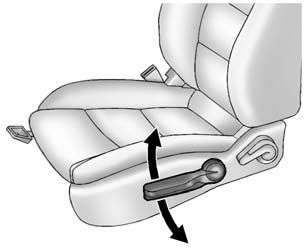
If available, move the lever up or down to manually raise or lower the seat.
 Front Seats
...
 Reclining Seatbacks
Warning
If either seatback is not locked, it could move forward in a sudden stop or
crash. That could cause injury to the person sitting there. Always push and pull
on the seatbacks to be sure th ...
Other materials:
Headlamp Bulb Replacement
Headlamp Bulb Replacement
Callout
Component Name
Preliminary Procedure
Open and support the hood assembly.
1
Accessory Bulb Cover?€‰(Qty:?€‰2)
2
Warning: Refe ...
Special Tools
Illustration
Tool Number/Description
CH-41013
J 41013
Rotor Resurfacing Kit
CH-42450-A
J 42450-A
Wheel Hub Resurfacing Kit
CH-45101
J ...
Fuel Pump Flow Control Module Replacement
Fuel Pump Flow Control Module Replacement
Callout
Component Name
Preliminary Procedures
Disconnect the battery negative cable. Refer to
Battery Negative Cable Disconnection and Connection.
Remove the right rear compart ...

0.0049