
Nissan Armada 2025-2026 Owner's Manual: STANDARD mode
The symbol of this Nissan Armada mode is
 .
.
STANDARD mode is the default setting in the Nissan Armada and is optimized for everyday driving. It provides a balanced combination of performance, comfort, and efficiency suitable for most road conditions.
ECO mode
Basic information
The symbol of this Nissan Armada mode is
 .
.
When ECO mode is activated in the Nissan Armada, 4WD modes such as 4H and 4L are unavailable. This mode prioritizes fuel efficiency by adjusting engine response and transmission behavior.
The Nissan Armada ECO mode supports smoother acceleration and more stable cruising, helping drivers adopt more fuel-efficient driving habits.
NOTE:
- Using ECO mode in the Nissan Armada does not guarantee improved fuel economy, as actual results depend on driving style, road conditions, and vehicle load.
- It is recommended to switch out of ECO mode in situations requiring
stronger acceleration, such as:
- Driving with heavy passengers or cargo
- Climbing steep inclines
ECO Customize (if so equipped)
The Nissan Armada ECO Customize feature allows drivers to fine-tune settings such as air conditioning, cruise control, and engine idling behavior to achieve a preferred balance between efficiency and performance.
- Cruise Control
When enabled, the Nissan Armada cruise control system adopts smoother acceleration patterns to improve fuel economy. When disabled, it returns to standard acceleration behavior.
NOTE:
When vehicle speed drops, such as during uphill driving, the Nissan Armada may take longer to return to the preset cruise speed compared to standard mode.
- Idling Stop
When activated, the Nissan Armada engine remains off for longer periods during idle conditions, even when the air conditioning system is in use, enhancing fuel efficiency. - Air Conditioning
When ECO air conditioning settings are enabled, system performance is slightly reduced to improve overall fuel consumption in the Nissan Armada.
Tire Pres ECO advice
The Nissan Armada includes a Tire Pressure ECO Advice feature that displays a message in the vehicle information display when low tire pressure is detected, helping optimize fuel efficiency.
When enabled, the ECO Drive Report will display the message: "Check Tire Pressures for Best Fuel Economy." You can switch directly to the tire pressure display using the steering wheel scroll control.
ECO Pedal Guide function (if so equipped)
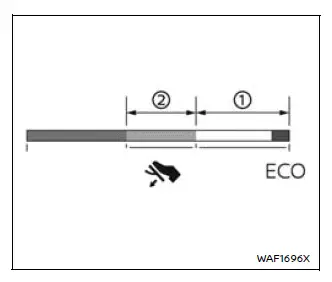
The Nissan Armada ECO Pedal Guide provides real-time feedback to help improve driving efficiency. This feature is displayed in the vehicle information screen when ECO mode is active.
Use this system to optimize fuel consumption by maintaining efficient throttle input.
When the ECO Pedal Guide bar is within range 1, the Nissan Armada is operating in a highly efficient driving zone.
When the bar is within range 2, the vehicle is still within an economical driving range.
If the bar moves outside ranges 1 and 2, it indicates that the accelerator pedal is being pressed beyond optimal efficiency levels.
The ECO Pedal Guide will not be displayed under the following conditions:
- Vehicle speed is below approximately 2 MPH (4 km/h).
- The Nissan Armada transmission is in P (Park), N (Neutral), or R (Reverse).
The Nissan Armada Drive Mode Selector system enhances adaptability, allowing drivers to switch seamlessly between performance and efficiency depending on driving conditions and preferences. :contentReference[oaicite:0]{index=0}
 Basic information
Drive Mode Selector (example)
Vehicle information display (example)
The Nissan Armada features a versatile Drive Mode Selector system that allows
the driver to tailor vehicle performance t ...
 SPORT mode
The symbol of this Nissan Armada mode is
.
When SPORT mode is activated in the Nissan Armada, the vehicle is tuned for a
more dynamic and responsive driving experience. In this mode, 4WD options s ...
Other materials:
Roof Rail Front Assist Handle Replacement
Roof Rail Front Assist Handle Replacement
Callout
Component Name
1
Roof Rail Front Assist Handle Fastener (Qty:?€‰2)
Caution: Refer to Fastener Caution.
Procedure
Fold the assist handle downward ...
Air Conditioning Compressor Replacement (LDE, LUW, LWE)
Air Conditioning Compressor Replacement
Callout
Component Name
Preliminary Procedure
Recover the refrigerant. Refer to Refrigerant Recovery and Recharging.
Raise and support the vehicle. Refer to Lifting and Jacking the
...
Safety information
WARNING
Always stop the Nissan Armada in a safe place and engage the parking
brake before operating the system. Using the system while driving can distract
the driver and increase the risk of accidents.
Maintain full attention on driving at all times. If the Nissan Armada
system respo ...

0.0066