
Chevrolet Sonic Owner's Manual: Storing the Tire Sealant and Compressor Kit
The tire sealant and compressor kit is located in the rear storage area.
1. Lift the trim cover.
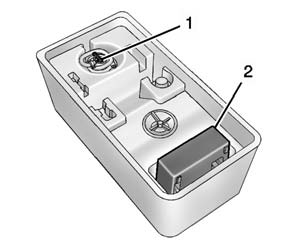
2. Remove the tire sealant canister (1) and the compressor (2).
To store the tire sealant canister and compressor:
1. Attach the sealant/air hose to the sealant canister inlet valve.
2. Return the sealant canister and the compressor to their original storage location.
 Using the Tire Sealant and Compressor Kit without Sealant to Inflate a Tire
(Not Punctured)
Using the Tire Sealant and Compressor Kit without Sealant to Inflate a Tire
(Not Punctured)
The kit includes:
1. Sealant Canister Inlet Valve
2. Sealant/Air Hose
3. Base of Sealant Canister
4. Tire Sealant Canister
5. On/Off Button
6. Slot on Top of Compressor
7. Pressure Deflation ...
 Tire Changing
...
Other materials:
Connecting a USB Storage Device or iPod/iPhone
To connect a USB storage device, connect the device to the USB port.
To connect an iPod/iPhone, connect one end of the device’s cable to the iPod/iPhone
and the other end to the USB port.
The iPod/iPhone charges while it is connected to the vehicle if the vehicle is
in the ACC/ACCESSORY or O ...
Front Floor Console Cover Replacement (Automatic Transmission)
Front Floor Console Cover Replacement
Callout
Component Name
1
Front Floor Console Cover Assembly
Procedures
Apply the parking brake.
Move the shifter from ?€?Park?€? to the ?€?Neutral?€? position.
...
Radiator Replacement (LDE LUW)
Radiator Replacement
Callout
Component Name
Preliminary Procedures
Drain the coolant. Refer to Cooling System Draining and Filling.
Remove the engine coolant temperature sensor.
Remove the air conditioning condenser. R ...

0.0049