
Nissan Armada 2025-2026 Owner's Manual: System maintenance (ProPILOT Assist 2.1)
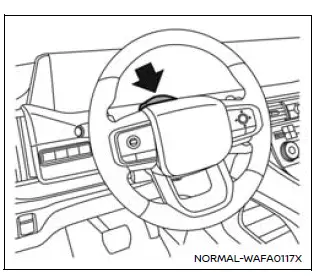
To ensure optimal performance of the Nissan Armada ProPILOT Assist 2.1 system, it is essential to keep the driver monitor area clean and unobstructed at all times.
Carefully remove any dust, dirt, or smudges using a clean, soft cloth such as a lens-cleaning cloth. Maintaining a clear camera surface allows the Nissan Armada driver monitoring system to accurately detect driver attention and ensure safe system operation.
TERMS OF USE OF USHR INC. MATERIAL AND AGREEMENT TO END USER SUBLICENSE AGREEMENT
This Nissan Armada vehicle integrates advanced data, proprietary software, and intellectual property elements, collectively referred to as “Ushr Materials,� which are embedded within the driver assistance systems. These materials are licensed from Ushr Inc. and are subject to specific terms and conditions.
By using the Nissan Armada and its associated systems, you acknowledge and agree to comply with the Ushr Inc. Terms of Use and End User Sub-License Agreement. These terms are available at www.ushrauto.com/legal and are incorporated by reference into this vehicle documentation. If you do not accept these terms, you must refrain from using the associated systems and materials.
The license agreement affects your legal rights and includes, among other provisions, usage restrictions, limitations of liability, intellectual property protections, and a waiver of jury trial rights. The Ushr Materials are provided strictly on an “AS IS� basis without any warranties of any kind.
All Ushr Materials, including software and confidential information, are protected and remain the exclusive property of Ushr Inc. Any unauthorized reproduction, extraction, modification, or transfer of these materials—whether in whole or in part—is strictly prohibited without prior written consent.
 2022
Ushr Inc. All Rights Reserved.
2022
Ushr Inc. All Rights Reserved.
"Ushr", "Ushr Auto", associated logos, and related branding elements are trademarks and intellectual property of Ushr Inc., and all rights are reserved.
 OpenStreetMap
contributors, www.openstreetmap.org/copyright.
OpenStreetMap
contributors, www.openstreetmap.org/copyright.
 Passing Assist (ProPILOT Assist 2.1)
Basic information
Passing Assist in the Nissan Armada is an advanced feature of ProPILOT Assist
2.1, engineered to support safer and more efficient overtaking maneuvers on highways.
Before using ...

Other materials:
Rear Compartment Lid Weatherstrip Replacement
Rear Compartment Lid Weatherstrip Replacement
Callout
Component Name
1
Rear Compartment Lid Weatherstrip
Procedure
Disconnect any electrical connector.
Clean the area where the seal will be mounted. Use a suit ...
Instrument Panel Upper Compartment Door Latch Replacement
Instrument Panel Upper Compartment Door Latch Replacement
Callout
Component Name
1
Instrument Panel Upper Compartment Door Latch
Procedures
Open the instrument panel compartment door.
Unsnap the instrument com ...
Fuel Pressure Measurement
Special Tools
EN 34730?E1 Pressure Tester
For equivalent regional tools, refer to Special Tools
Warning: Gasoline or gasoline vapors are highly flammable. A fire
could occur if an ignition source is present. Never drain or store gasoline
or diesel fuel in an open con ...

0.0048