
Chevrolet Sonic Owner's Manual: Transmission
Automatic Transmission
Manual Mode
This position allows you to change gears similar to a manual transmission. To use this feature:
1. Move the shift lever from D (Drive) rearward to M(Manual Mode).
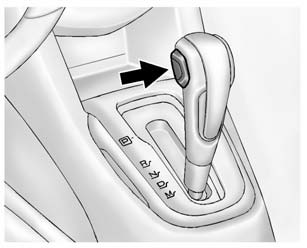
2. Press the + (plus) end of the button on the side of the shift lever to upshift, or push the − (minus) end of the button to downshift.
See Manual Mode.
Manual Transmission
Up-Shift Light

Vehicles equipped with a manual transmission may have an up-shift light. This light indicates when to shift to the next higher gear for better fuel economy.
For the best fuel economy, accelerate slowly and shift when the light comes on, if weather, road, and traffic conditions allow.
It is normal for the light to go on and off if the accelerator position changes quickly. Ignore the light during downshifts.
Reverse Lockout
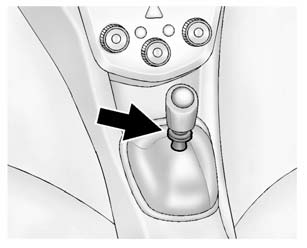
The manual transmission is equipped with a reverse lockout ring. To shift into R (Reverse), press down the clutch pedal, lift up the ring on the shift lever, and shift into R (Reverse). Let up on the clutch pedal slowly while pressing the accelerator pedal.
See Manual Transmission.
 Climate Controls
If equipped with these climate control systems, the heating, cooling, and ventilation
can be controlled for the vehicle.
Climate Control System with Heater and Air Conditioning
1. Temperature Co ...
 Vehicle Features
...
Other materials:
Rear Side Door Window Weatherstrip Replacement (Sedan)
Rear Side Door Window Weatherstrip Replacement
Callout
Component Name
Preliminary Procedures
The rear door side window weatherstrip and window is serviced as
one assembly. Refer to Rear Side Door Stationary Window Replacement. ...
Turbocharger Wastegate Regulator Solenoid Valve Replacement
Charge Air Bypass Regulator Solenoid Valve Replacement
Callout
Component Name
Preliminary Procedure
Disconnect the radiator outlet hose from the water inlet. Refer to Water
Inlet Replacement.
1
...
Oil Pan Cleaning and Inspection
Warning: Wear safety glasses when using compressed air in order
to prevent eye injury.
Caution: To ensure proper engine lubrication, clean clogged or
contaminated oil galleries in an approved solvent and with compressed air.
Failure to clean oil galleries may cause ...

0.0054