
Chevrolet Sonic Owner's Manual: Climate Controls
If equipped with these climate control systems, the heating, cooling, and ventilation can be controlled for the vehicle.
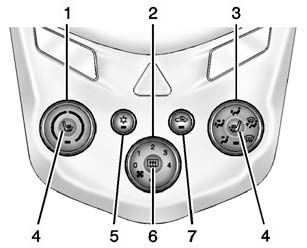
Climate Control System with Heater and Air Conditioning
1. Temperature Control
2. Fan Control
3. Air Delivery Mode Control
4. Driver and Passenger Heated Seats (If Equipped)
5. Air Conditioning
6. Rear Window Defogger
7. Recirculation
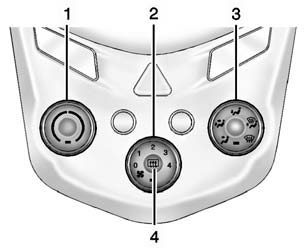
Climate Control System with Heater Only
1. Temperature Control
2. Fan Control
3. Air Delivery Mode Control
4. Rear Window Defogger
See Climate Control Systems.
 Windshield Wiper/Washer
Sedan
Hatchback
The windshield wiper/washer lever is on the right side of the steering column.
Move the lever to one of the following positions:
HI: Use for fast wipes.
LO: Use for slow wipes ...
 Transmission
Automatic Transmission
Manual Mode
This position allows you to change gears similar to a manual transmission. To
use this feature:
1. Move the shift lever from D (Drive) rearward to M(Manual Mode ...
Other materials:
Drunk Driving
Death and injury associated with drinking and driving is a global tragedy.
Warning
Drinking and then driving is very dangerous. Your reflexes, perceptions, attentiveness,
and judgment can be affected by even a small amount of alcohol. You can have a serious
— or even fatal — collision if y ...
Heated Seats Description and Operation
Heated Seat Components
The driver and passenger heated seats each consist of the following components:
Left heated seat switch
Right heated seat switch
HVAC control module
Seat heating control module
Seat cushion heating element
Seat back heating element
Seat cushion ...
Cold weather driving
Freeing a frozen door lock
To avoid door lock freezing in cold conditions, it is recommended to apply a
suitable deicer into the keyhole of your Nissan Armada before temperatures drop
significantly.
If the lock on your Nissan Armada becomes frozen, gently warm the key before
inserting it int ...

0.0069