
Chevrolet Sonic Repair Manual: Transmission Mount Replacement - Left Side
- Removal Procedure
-
- Remove the battery tray. Refer to Battery Tray Replacement.
- Install the engine support fixture. Refer to Engine Support Fixture.
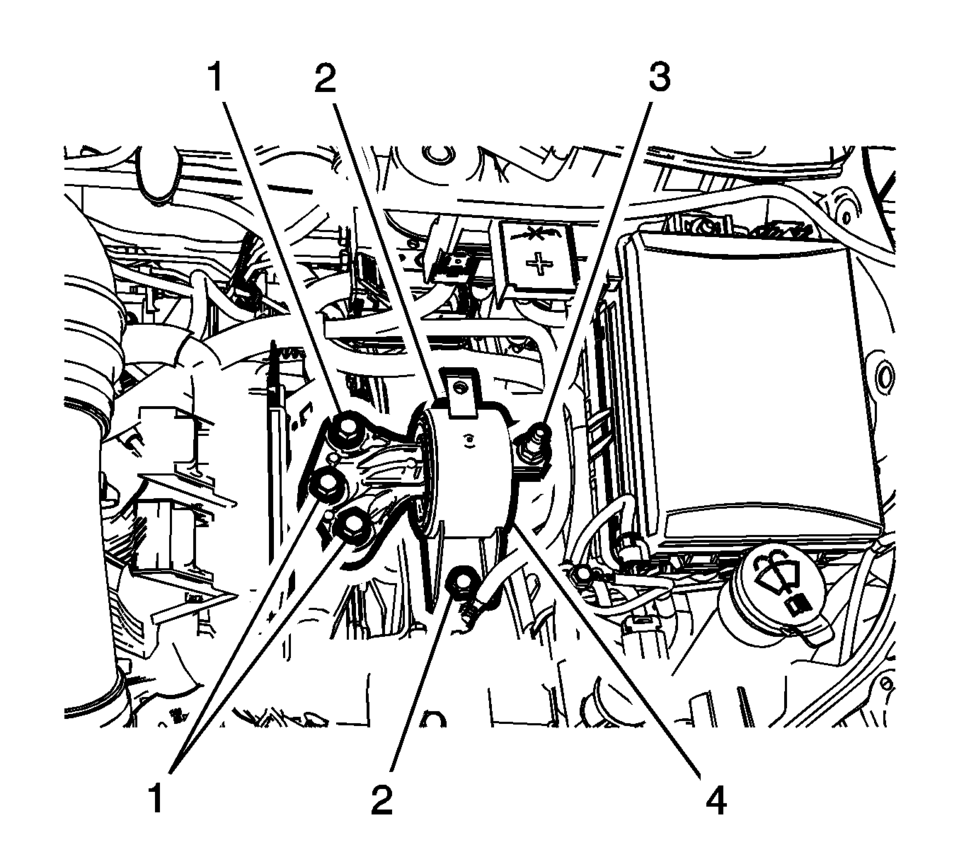
- Remove and DISCARD the left transmission mount to bracket bolts (1).
- Remove the left transmission mount to body bolts (2).
- Remove the left transmission mount to body nut (3).
- Remove the left transmission mount (4) from the vehicle.
- Installation Procedure
-
- Install the left transmission mount (4) to the vehicle.
- Install the left transmission mount to body bolts (2)
and tighten to 58 Y (43 lb ft)
.
- Install the left transmission mount to body nut (3)
and tighten to 58 Y (43 lb ft)
.
- Install the NEW left transmission mount to transmission
bolts (1) and tighten to 50 Y (37 lb ft)
plus 60?5 degrees
.
- Remove the engine support fixture. Refer to Engine Support Fixture.
- Install the battery tray. Refer to Battery Tray Replacement.
Caution:
Refer to Fastener Caution.
 Transmission Mount Bracket Replacement - Rear
Removal Procedure
Raise and support the vehicle. Refer to
Lifting and Jacking the Vehicle.
Remove the front suspension skid plate, if equipped.
Refer to Drivetrain and Front Su ...
Other materials:
P-Metric Sized Tires Description
245/50r16953typeloadindep-passengerttemporarylt-lighttruckspeedsymbolsectionwidth(millimeters)235245275construction(sectionwidth)ddagonal(bas)40sectionwidthsectionheight
Replacement tires should be of the same tire performance criteria (TPC) specification
number. This will ensure the same size, ...
Transmission Fluid Cooler Flushing and Flow Test
GM studies indicate that plugged or restricted transmission oil coolers and pipes
cause insufficient transmission lubrication and elevated operating temperatures
which can lead to premature transmission failure. Many repeat repair cases could
have been prevented by following published procedur ...
NISSAN Advanced Air Bag System (front seats)
Crash zone sensor
Supplemental front-impact air bag modules (NISSAN Advanced Air Bags)
Occupant classification system control unit
Occupant classification sensors (weight sensors)
Front central seat-mounted side-impact supplemental air bag (if so equipped)
Roof-mounted curtain side- ...

0.0077