
Chevrolet Sonic Owner's Manual: Vehicle Alarm System
This vehicle has an anti-theft alarm system.
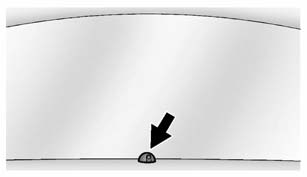
The indicator light on the instrument panel near the windshield indicates the status of the system.
Off: Vehicle is disarmed.
On Solid: Vehicle is secured during the delay to arm the system.
Fast Flash: Vehicle is unsecured. A door, the hood, or the trunk/ liftgate is open.
Slow Flash: Alarm system is armed.
 Vehicle Security
This vehicle has theft-deterrent features; however, they do not make the vehicle
impossible to steal. ...
 Arming the AlarmSystem
1. Close all doors, the trunk/liftgate, and the hood.
2. Lock the vehicle in one of two ways:
Use the RKE transmitter.
With a door open, press on the
interior of the door.
3. After 30 se ...
Other materials:
Loss of Control
Skidding
There are three types of skids that correspond to the vehicle's three control
systems:
Braking Skid — wheels are not rolling.
Steering or Cornering Skid — too much speed or steering in a curve causes
tires to slip and lose cornering force.
Acceleration Skid — too muc ...
Engine Overheating
The vehicle has an indicator to warn of the engine overheating.
If the decision is made not to lift the hood when this warning appears, get service
help right away. See Roadside Assistance Program.
If the decision is made to lift the hood, make sure the vehicle is parked on
a level surface.
T ...
Front Side Door Trim Replacement
Front Side Door Trim Replacement
Callout
Component Name
Preliminary Procedure
Remove the front side door upper front trim panel. Refer to Front Side
Door Upper Front Trim Panel Replacement.
1
Fr ...

0.0059