
Chevrolet Sonic Repair Manual: Front Wheel Drive Shaft Seal Replacement - Right Side
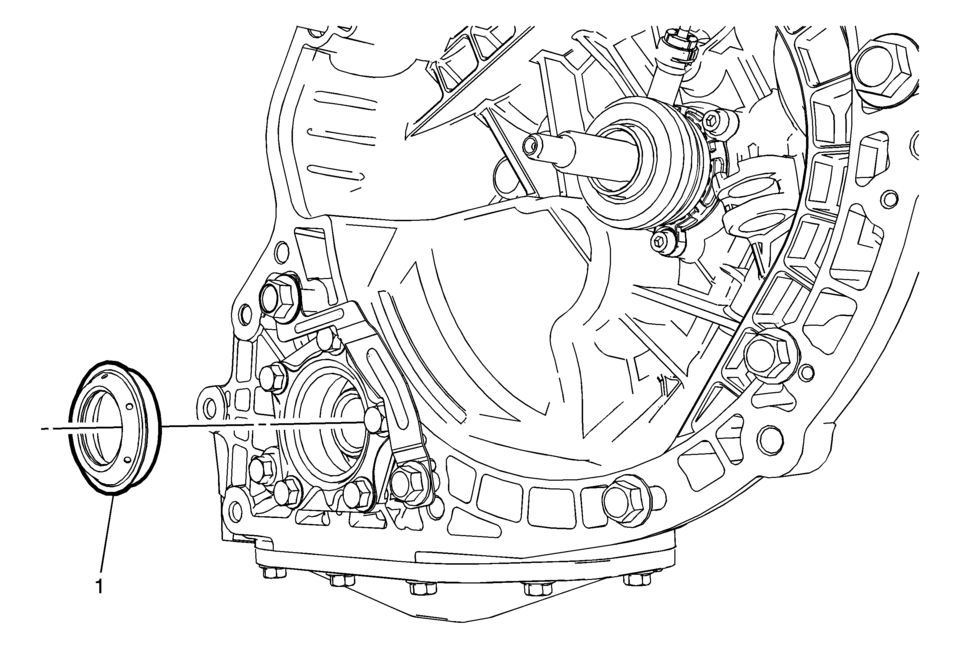
|
Callout |
Component Name |
|---|---|
Preliminary Procedures
|
|
|
1 |
Right Front Wheel Drive Shaft Oil Seal Procedure
Note: Do not reuse the wheel drive shaft oil seal.
For equivalent regional tools, refer to Special Tools. |
 Front Wheel Drive Shaft Seal Replacement - Left Side
Special Tools
DT-446 Installer Drift
DT-7004 Slide Hammer
DT-23129 Universal Seal Remover
For equivalent regional tools, refer to Special Tools.
Removal Procedure
Raise and ...
 Gear Position Sensor Replacement
Gear Position Sensor Replacement
Callout
Component Name
Preliminary Procedure
Unclip the engine control module (ECM) and bracke ...
Other materials:
Air Conditioning Compressor Oil Balancing
Draining Procedure
Note: Drain and measure as much of the refrigerant oil as
possible from the removed compressor.
Drain the oil from both the suction and discharge ports of the removed
compressor into a clean, graduated container. Rotate the compressor sha ...
Torque Converter Removal
Torque Converter Removal
Callout
Component Name
1
Lock Pin
Warning: Lock pin must be secured into the bench fixture to
hold the transmission and prevent bodily injury.
Note: Ensure the DT ...
Maintenance requirement
Basic information
Routine care and consistent maintenance are essential to keep your Nissan Armada
operating at peak performance, preserving both its mechanical integrity and emission
efficiency.
Regular servicing ensures that the engine, drivetrain, and all critical systems
of your Nissan A ...

0.006