
Chevrolet Sonic Repair Manual: Generator Pulley Replacement (LUV)
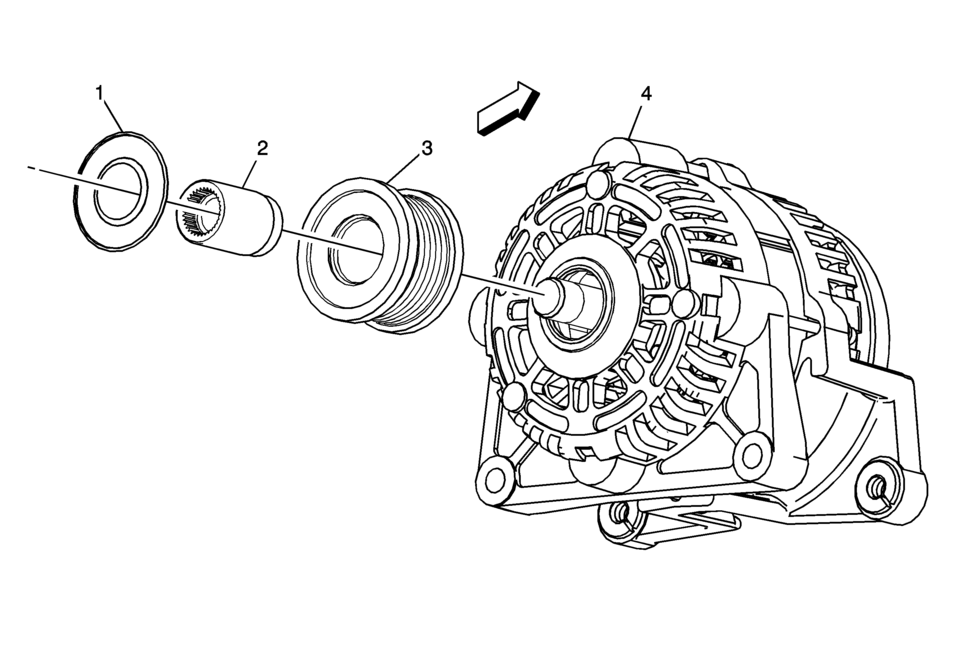
|
Callout |
Component Name |
|---|---|
|
Preliminary Procedure
Remove the generator. Refer to Generator Replacement. |
|
|
1 |
Generator Pulley Nut Cap |
|
2 |
Generator Pulley Nut Caution: Refer to Fastener Caution. Procedure
Remove the generator pulley nut by using EN-6372 counterhold . Tighten
90 Y (66 lb ft) Special Tools
EN-6372 Counterhold For equivalent regional tools, refer to Special Tools. |
|
3 |
Generator Pulley |
|
4 |
Generator |
 Front Fog Lamp Package Installation
Installation Instructions Part Number
95950443
d2.50.5nm(220.5nmlbin)
d2.5nm(22lbin)(220.5nmlbin)
& ...
 Remote Control Door Lock, Theft Deterrent, and Remote Start Transmitter Package
Installation
Remote Control Door Lock, Theft Deterrent, and Remote Start Transmitter Package
Installation
Installation Instructions Part Number
22880351
20997377
95198137
22901614
92233547
Kit Usage
This kit adds remote start to vehicles without option BTV. The vehicle
must also h ...
Other materials:
Basic information
Example
Example
WARNING
In the Nissan Armada, improper adjustment of the HUD brightness or position
may obstruct the driver’s forward visibility through the windshield, increasing
the risk of accidents that could lead to serious injury or death.
Do not focus on the Head U ...
LDW/I-LI system limitations
WARNING
The following outlines important limitations of the Nissan Armada LDW and
I-LI systems. Failure to understand and follow these limitations may result in serious
injury or death.
The Nissan Armada I-LI system may activate unintentionally when changing
lanes without signaling or wh ...
Hill descent control system
Basic information
WARNING
Do not rely solely on the Hill Descent Control system in the Nissan Armada
to regulate speed on steep downhill slopes. Always maintain full control of
the vehicle and use the brake pedal when necessary. Extra caution is required
on slippery, muddy, icy, or ext ...

0.0069