
Chevrolet Sonic Repair Manual: Input Shaft Support Replacement (Gen 2)
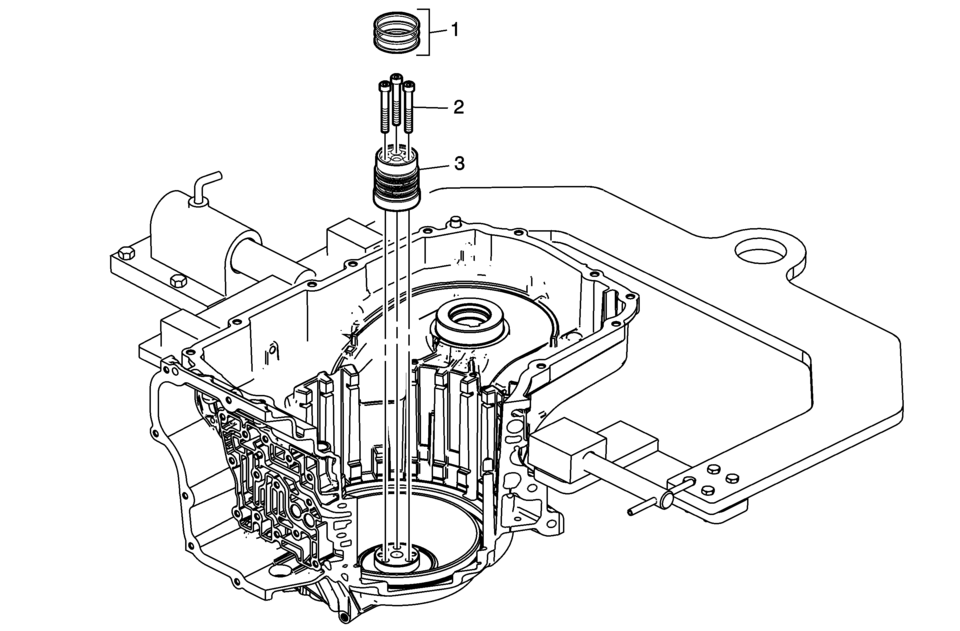
|
Callout |
Component Name |
|---|---|
|
1 |
3-5 Reverse and 4-5-6 Clutch Fluid Seals (Qty: 3) Note:
|
|
2 |
Input Shaft Support Bolts M6 x 50 (Qty: 3) Caution: Refer to Fastener Caution.
12 Y (106 lb in) |
|
3 |
Input Shaft Support Note: Inspect the support for wear, damage or porosity. |
 Input Shaft Support Replacement (Gen 1)
Input Shaft Support Replacement
Callout
Component Name
1
3-5 Reverse and 4-5-6 Clutch Fluid Seals (Qty: 4)
...
 Input Speed Sensor Replacement
Removal Procedure
Remove the control solenoid valve and transmission
control module assembly. Refer to Control Solenoid
Valve and Transmission Control Module Assembly Replacement. ...
Other materials:
Driver or Passenger Seat Shoulder Belt Replacement (without A69)
Driver or Passenger Seat Shoulder Belt Replacement
Callout
Component Name
Warning: Refer to SIR Warning.
Warning: Refer to SIR Seatbelt Pretensioner Handling Warning.
Warning: In order to prevent ...
Special Tools
Illustration
Tool Number/Description
CH 9127-E
SA 9127-E
Fuel Pressure/Flow Adapter
CH 9182-E
SA 9182-E
Electronic Fuel Injector Tester
...
Basic information
WARNING
Failure to properly follow the safety guidelines and operating instructions
for the Nissan Armada Intelligent Blind Spot Intervention (I-BSI) system may result
in serious injury or even fatal accidents.
The Nissan Armada I-BSI system is designed as a driver assistance feature
and ...

0.011