
Chevrolet Sonic Repair Manual: Manual Transmission Shift Lever Cable Adjustment
Special Tools
DT-527-A Adjuster or 5mm drill bit
For equivalent regional tools, refer to Special Tools.
- Remove the floor console. Refer to Front Floor Console Replacement.
- Lift upward and disengage (do not remove) cable lock adjuster (1) to release the internal cable assembly, one for each cable.
- Lock the transmission gear control with DT-527-A pin (1) or 5mm drill bit.
- Lock the position of the shifter control lever by rotating the reverse lockout device with the following instructions:
- Push down on tab (1) and pull up on device (2) to release from installed position.
- Rotate device 180 degrees so tab (1) is in the rear of the shift control assembly.
- Secure integral pins in holes located on shifter base by pushing down device (2) until seated.
- Secure adjuster locks (3) by pushing down until locked. One for each cable.
- Reposition the reverse lockout device with the following instructions:
- Push down on tab (1) and pull up on device (2) to release from installed position.
- Rotate device (2) 180 degrees so tab (1) is in the front of the shift control assembly.
- Push downward on the reverse lockout device (2) until tab (1) snaps into detent.
- Remove the DT-527-A lock pin or drill bit from the transmission gear control.
- Install the floor console. Refer to Front Floor Console Replacement.
- Verify correct operation of the transmission control assembly.
Note:
Not using the specified tools may lead to shift system mis-adjustment.

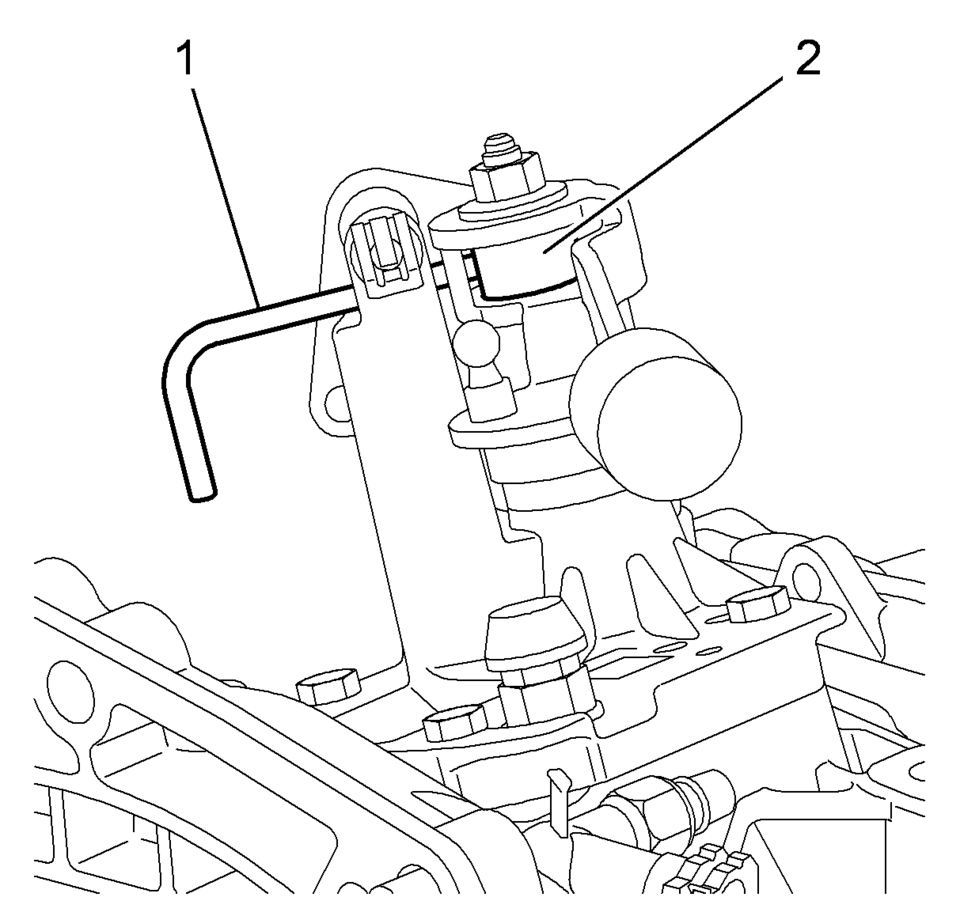
Note:
The hole of the transmission gear control (2) must be aligned to the hole in the base so the pin (1) can pass thru both. The transmission gear control will be locked in the 1? neutral position.
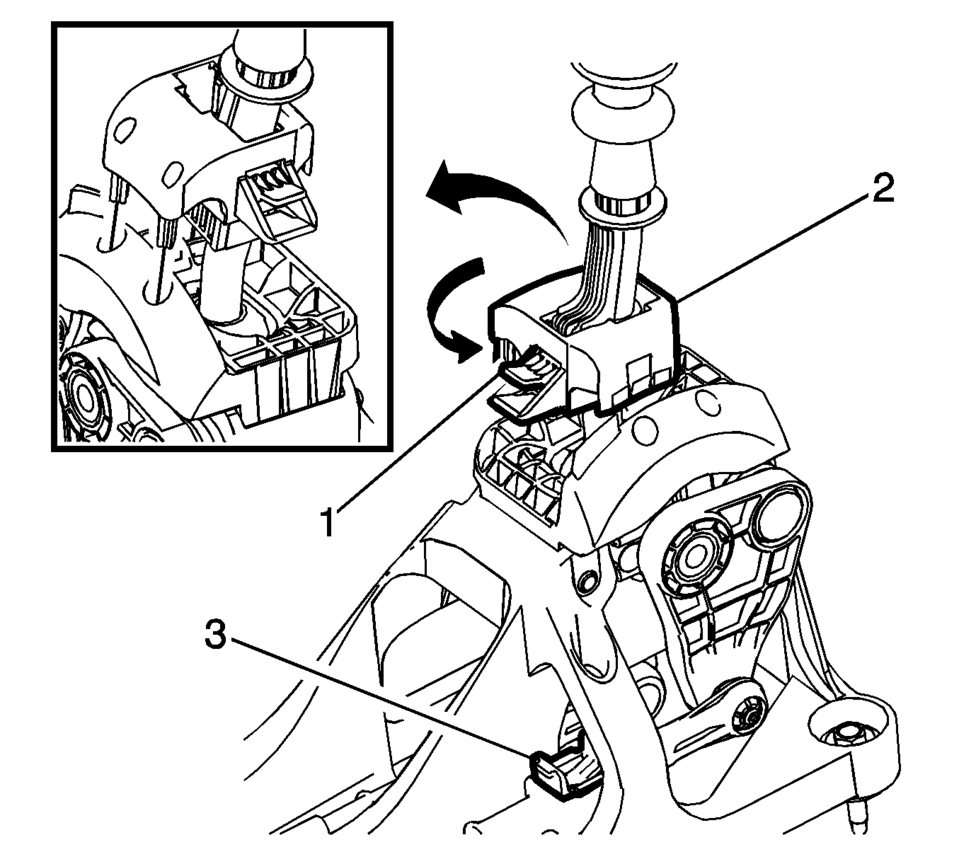
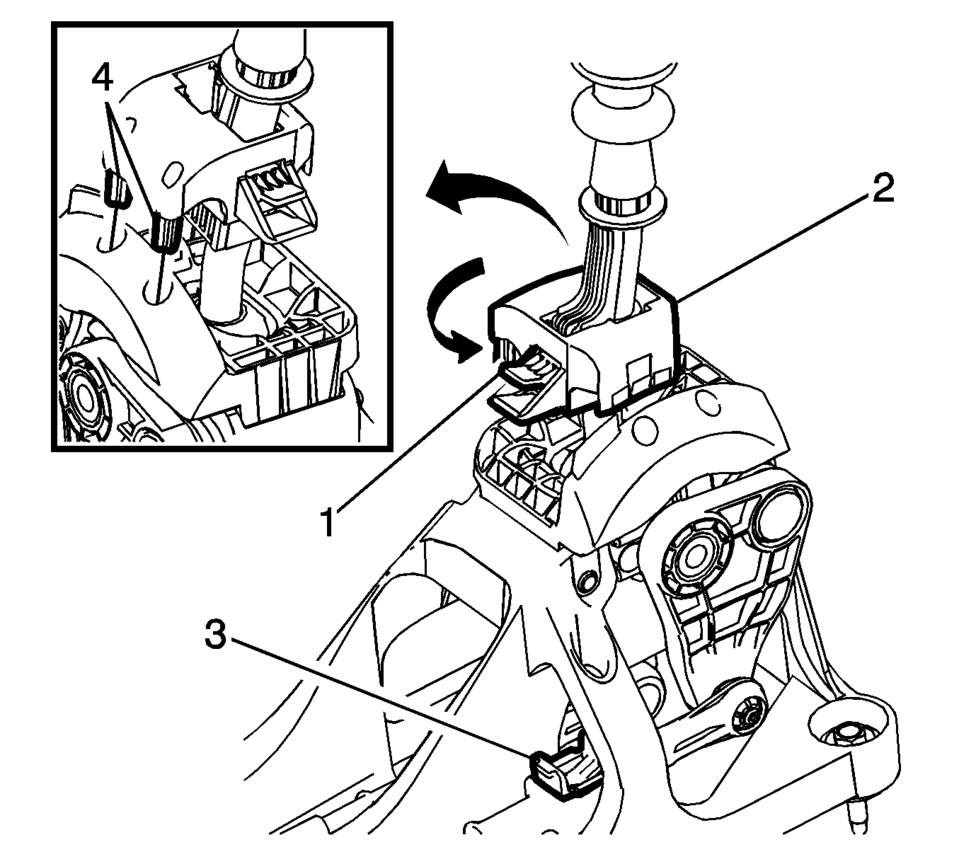
Note:
During this procedure DO NOT touch or preload the fixed shift lever as this may cause mis-adjustment to the shift system.
 Main Shaft Disassemble (Gen 2)
Special Tools
69604356 Gear Pullers
For equivalent regional tools, refer to Special Tools.
Remove the 1st gear thrust washer (1) and the 1st gear (2)
using 69604356 pull ...
 Manual Transmission Shift Lever and Selector Lever Cable Adjustment
Remove the floor console. Refer to
Front Floor Console Replacement.
Lift upward and disengage (do not remove) both cable lock
adjusters (1) to release the internal cable asse ...
Other materials:
Tire Pressure Light
For vehicles with the Tire Pressure Monitor System (TPMS), this light comes on
briefly when the engine is started. It provides information about tire pressures
and the TPMS.
When the Light Is On Steady
This indicates that one or more of the tires are significantly underinflated.
Stop as soo ...
Windshield Washer Solvent Container Replacement
Windshield Washer Solvent Container Replacement
Callout
Component Name
Preliminary Procedures
Remove the windshield washer solvent container filler tube. Refer
to Windshield Washer Solvent Container Filler Tube Replacement.
...
Camshaft Intake and Exhaust Sprocket Replacement
Special Tools
EN-955-A Locking Pin
For equivalent regional tools, refer to Special Tools.
Removal Procedure
Remove the air cleaner assembly. Refer to Air Cleaner Assembly Replacement.
Remove the camshaft cover. Refer to Camshaft Cover Replacement.
Remove both camshaft p ...

0.0194