
Chevrolet Sonic Repair Manual: Rear Bumper Impact Bar Replacement (Sedan)
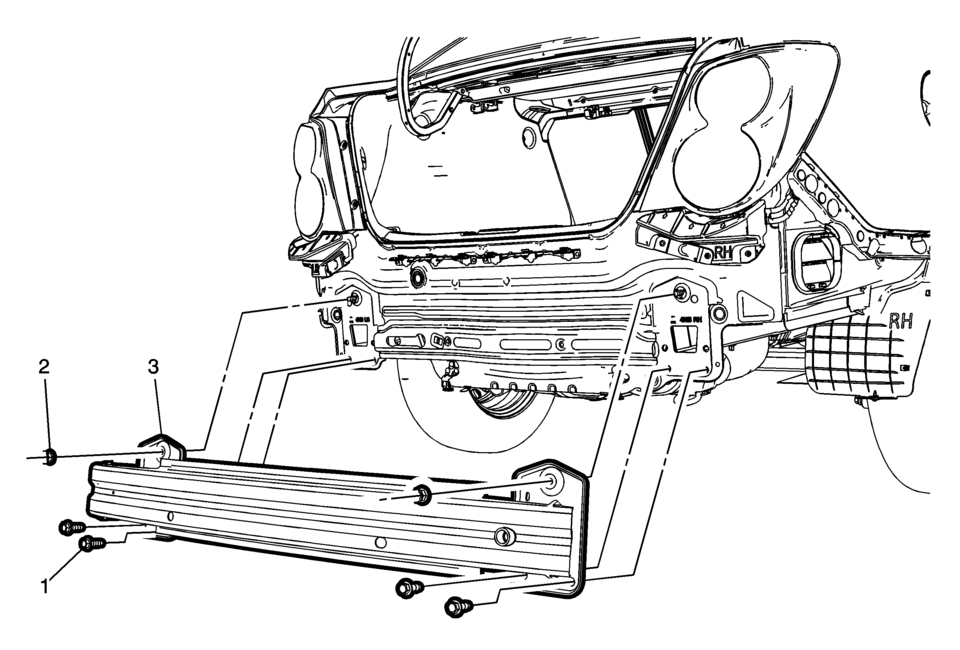
|
Callout |
Component Name |
|---|---|
|
Preliminary Procedure
Remove the rear bumper fascia. Refer to Rear Bumper Fascia Replacement. |
|
|
1 |
Rear Bumper Impact Bar Bolt (Qty:?€‰4) Caution: Refer to Fastener Caution.
52?€‰Y (38?€‰lb?€‰ft) |
|
2 |
Rear Bumper Impact Bar Nut (Qty:?€‰2) Tighten
52?€‰Y (38?€‰lb?€‰ft) |
|
3 |
Rear Bumper Impact Bar Procedure
Transfer any parts as needed. |
 Rear Bumper Impact Bar Replacement (Hatchback)
Rear Bumper Impact Bar Replacement
Callout
Component Name
Preliminary Procedure
Remove the rear bumper fascia. Refer to Rear Bu ...

Other materials:
Loss of Control
Skidding
There are three types of skids that correspond to the vehicle's three control
systems:
Braking Skid — wheels are not rolling.
Steering or Cornering Skid — too much speed or steering in a curve causes
tires to slip and lose cornering force.
Acceleration Skid — too muc ...
Seat Adjustment
Manual Seats
Warning: You can lose control of the vehicle if you try to adjust
a driver seat while the vehicle is moving. Adjust the driver seat only when
the vehicle is not moving.
To adjust a manual seat:
Pull the handle at the front of the seat.
Slide the ...
Rear Wheel Speed Sensor Replacement
Removal Procedure
Warning: Refer to Brake Dust Warning.
Raise and support the vehicle. Refer to Lifting and Jacking the Vehicle.
Remove the tire and wheel assembly. Refer to Tire and Wheel Removal
and Installation.
Remove the rear wheel speed sensor ...

0.0057