
Chevrolet Sonic Owner's Manual: Vehicle Alarm System
This vehicle has an anti-theft alarm system.
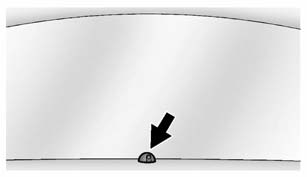
The indicator light on the instrument panel near the windshield indicates the status of the system.
Off: Vehicle is disarmed.
On Solid: Vehicle is secured during the delay to arm the system.
Fast Flash: Vehicle is unsecured. A door, the hood, or the trunk/ liftgate is open.
Slow Flash: Alarm system is armed.
 Vehicle Security
This vehicle has theft-deterrent features; however, they do not make the vehicle
impossible to steal. ...
 Arming the AlarmSystem
1. Close all doors, the trunk/liftgate, and the hood.
2. Lock the vehicle in one of two ways:
Use the RKE transmitter.
With a door open, press on the
interior of the door.
3. After 30 se ...
Other materials:
Manifold Absolute Pressure Sensor Replacement
.-
Manifold Absolute Pressure Sensor Replacement
Callout
Component Name
1
Manifold Absolute Pressure Sensor Fastener
Caution: Refer to Fastener Caution
Tighten
6 Y (54 lb in)
...
Automatic Transmission Shift Lock Control Description and Operation
The automatic transmission park lock control system is a safety device that prevents
an inadvertent shift out of PARK. The driver must press the brake pedal before moving
the park lever out of the PARK position. The system consists of the following components:
The automatic transmission pa ...
Transmission Case Disassemble (Gen 1)
Special Tools
3-9506289 Universal Adapter
J-810700 Mainshaft Bearing Remover
J-810704 Center Bar Puller
M-680770 Universal Sliding Mallet
R-0007758 Holding Fixture
R-0007770 Holding Fixture Adapter Plates
T-0307000 Extractor and Driver Fixture
T-9807671 Slide Hammer
For eq ...

0.0056