
Nissan Armada 2025-2026 Owner's Manual: Basic information
WARNING
- In the Nissan Armada, always keep the doors securely locked while driving. Combined with proper seat belt use, this significantly enhances passenger safety by reducing the risk of ejection during an accident and preventing unauthorized access from outside.
- Before opening any door in the Nissan Armada, carefully check for approaching vehicles, cyclists, or pedestrians to avoid potential collisions.
- To reduce the risk of injury or fatal incidents in the Nissan Armada,
never leave children, individuals requiring assistance, or pets unattended inside
the vehicle.
Interior temperatures in a closed Nissan Armada can rise rapidly, especially in warm weather, creating dangerous and life-threatening conditions.
Locking with key
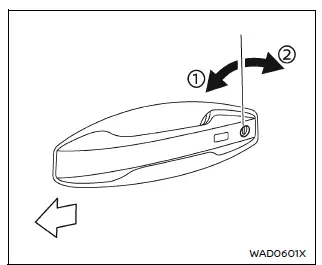
To lock the driver’s door in the Nissan Armada, insert the key into the door cylinder and turn it toward the rear of the vehicle 2.
To unlock, rotate the key toward the front of the Nissan Armada 1.
For unlocking all doors, refer to the Nissan Armada power door lock switch, Intelligent Key system, or remote keyless entry functions.
Locking with inside lock knob
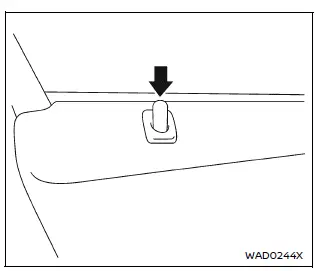
To lock a door from inside the Nissan Armada, push down the lock knob located on the door panel.
Always ensure the Nissan Armada Intelligent Key is not left inside the vehicle when locking doors manually.
Unlocking with inside handle
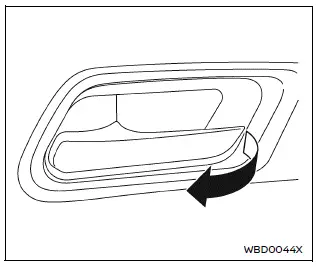
To unlock and open a door in the Nissan Armada, pull the interior handle once to unlock, and pull again to open the door fully.
 Doors
Doors
...
 Locking with power door lock switch
Driver's armrest
Front passenger's armrest
Basic information
The Nissan Armada power door lock system allows centralized locking and unlocking
of all doors using switches located ...
Other materials:
Remote Control Door Lock Receiver Replacement
Remote Control Door Lock Receiver Replacement
Callout
Component Name
Preliminary Procedure
Remove the windshield outside moisture sensor cover. Refer to Windshield
Outside Moisture Sensor Cover Replacement.
...
Airbag Side Impact Sensor Replacement (with AYF/AYO)
Airbag Side Impact Sensor Replacement
Callout
Component Name
Warning: Refer to SIR Warning.
Warning: Refer to SIR Inflator Module Handling and Storage
Warning.
Warning: Following the deployment o ...
Front Floor Console Cover Replacement (Automatic Transmission)
Front Floor Console Cover Replacement
Callout
Component Name
1
Front Floor Console Cover Assembly
Procedures
Apply the parking brake.
Move the shifter from ?ark?to the ?eutral?
position.
Use a flat-bl ...

0.0059