
Nissan Armada 2025-2026 Owner's Manual: Cockpit
Example
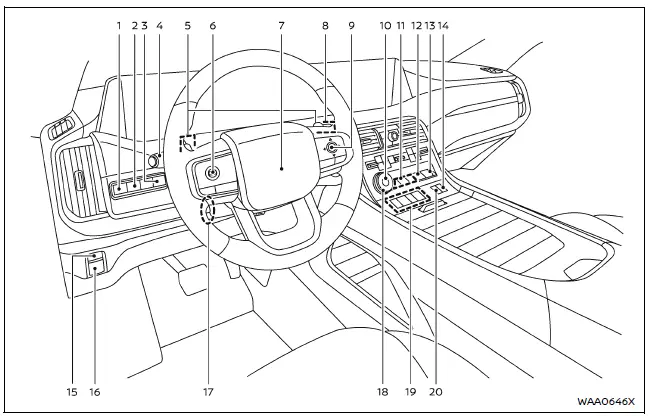
The cockpit of the Nissan Armada is thoughtfully designed to provide intuitive control, comfort, and accessibility for the driver. Every switch, button, and control element is positioned to enhance driving convenience and ensure that essential functions are always within easy reach.
- Steering Assist switch — allows activation of advanced driving assistance features in the Nissan Armada.
- Head Up Display (HUD) switch* — enables projection of key driving information directly onto the windshield.
- Power liftgate switch* — provides quick and effortless operation of the rear liftgate.
- Headlight and turn signal switch / Fog light switch* — controls exterior lighting systems for improved visibility.
- Paddle shifters — allow manual gear selection for a more dynamic driving experience in the Nissan Armada.
- Steering-wheel-mounted controls (left side)
- ProPILOT Assist switch — activates advanced driver assistance features.
- Volume control** — adjusts audio output easily without taking hands off the wheel.
- Steering wheel
- Horn — provides audible signaling when required.
- Wiper and washer switch — manages windshield cleaning functions for clear visibility.
- Steering-wheel-mounted controls (right side)
- Vehicle information display control — navigates onboard data and system menus.
- Touch screen display control** — integrates multimedia and system access.
- Audio control** — manages entertainment system settings.
- Bluetooth Hands-Free Phone System switches** — enables safe communication while driving.
- Voice Recognition system switch** — allows voice command interaction with the Nissan Armada.
- Hill descent control switch* — assists with controlled descents on steep terrain.
- 4WD shift switch* — adjusts drivetrain settings for different driving conditions.
- Differential lock mode switch* — enhances traction in challenging off-road environments.
- Vehicle Dynamic Control (VDC) OFF switch — allows temporary deactivation of stability control systems.
- Idling Stop OFF switch — disables automatic engine stop/start functionality.
- Automatic brake hold switch — maintains braking force without continuous pedal pressure.
- Parking brake switch — electronically engages or releases the parking brake.
- Tilt and telescopic steering wheel control* / lock lever* — enables precise adjustment of steering wheel position.
- Drive mode selector* — allows selection of various driving modes tailored to road conditions.
- Shift buttons — provide modern gear selection control in the Nissan Armada.
- Air suspension AUTO switch* — automatically adjusts suspension height for comfort and performance.
*: if so equipped
**: Refer to the separate NissanConnect Owner's Manual (if so equipped).

 Instrument panel
Example
The instrument panel of the Nissan Armada combines advanced technology with ergonomic
design, providing clear visibility of all essential driving information while maintaining
easy ac ...
Other materials:
Rear Side Door Window Replacement (Hatchback)
Rear Side Door Window Replacement
Callout
Component Name
Warning: Refer to Glass and Sheet Metal Handling Warning.
Preliminary Procedures
Remove the rear side door trim panel. Refer to Rear Side Door Trim
...
Body Rear Seat Back Trim Panel Replacement (with AMA/AM7)
Body Rear Seat Back Trim Panel Replacement
Callout
Component Name
Preliminary Procedure
Remove the body side trim panel. Refer to Body Side Trim Panel Replacement.
1
Body Rear Seat Back Trim Pane ...
Basic information
WARNING
Failure to properly follow the usage guidelines and safety instructions for
the RCTA system in the Nissan Armada may result in serious injury or even death.
The Rear Cross Traffic Alert system in the Nissan Armada is designed
as a supplemental aid and does not replace attentive dri ...

0.0065