
Nissan Armada 2025-2026 Owner's Manual: Instrument panel
Example
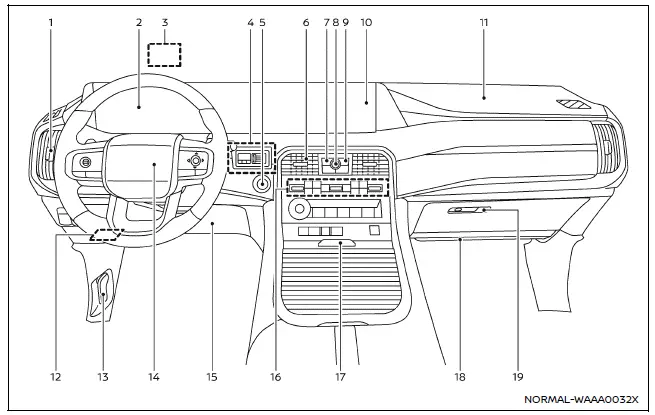
The instrument panel of the Nissan Armada combines advanced technology with ergonomic design, providing clear visibility of all essential driving information while maintaining easy access to controls and comfort features.
- Side ventilator — directs airflow for optimal cabin comfort.
- Meters and gauges / Clock — displays critical driving data and time information.
- Head Up Display (HUD)* — projects driving data directly onto the windshield.
- Trailer Brake Controller Unit (TBCU)* — assists in controlling trailer braking systems.
- Push-button ignition switch — enables quick and convenient engine start/stop functionality.
- Center ventilator — ensures balanced air distribution across the cabin.
- CAMERA* /
 button — activates camera systems for enhanced visibility and parking assistance.
 - Audio switches** — provide quick access to multimedia functions.
- Hazard indicator flasher switch — activates emergency hazard lights.
- Touch screen display**
- Intelligent Around View Monitor* — delivers a 360-degree view of surroundings.
- RearView monitor* — assists during reversing maneuvers.
- NissanConnect system** — integrates navigation, media, and connectivity features.
- Heater and air conditioner — controls cabin temperature and airflow.
- Defroster — clears windshield and windows in cold conditions.
- Heated steering wheel* — improves comfort in cold weather.
- Heated seats* — provides warmth for front occupants.
- Ventilated seats* — enhances cooling during hot conditions.
- Front passenger supplemental air bag — provides additional protection in frontal impacts.
- Fuse box — houses electrical system protection components.
- Hood release handle — allows access to the engine compartment.
- Driver supplemental front-impact air bag — enhances driver protection.
- Driver supplemental knee air bag — protects lower body during collisions.
- Heater and air conditioner — additional climate control interface.
- Console box
- Cup holders — convenient beverage storage.
- USB (Universal Serial Bus) connection ports** — enables device charging and connectivity.
- Wireless charger* — supports cable-free charging for compatible devices.
- Front passenger supplemental knee air bag — improves lower-body protection for the passenger.
- Glove box — provides storage for documents and personal items.
*: if so equipped
**: Refer to the separate NissanConnect Owner's Manual (if so equipped).
The Nissan Armada cockpit and instrument panel are engineered to deliver a premium driving experience, combining advanced technology, intuitive controls, and superior ergonomics to maximize comfort, safety, and convenience on every journey.
 Cockpit
Example
The cockpit of the Nissan Armada is thoughtfully designed to provide intuitive
control, comfort, and accessibility for the driver. Every switch, button, and control
element is positio ...
 Meters and gauges
Basic information
Example
The instrument cluster in the Nissan Armada is designed to provide clear, real-time
information about vehicle performance and status. It combines modern digital displ ...
Other materials:
USB Port
The USB Port, if equipped, is in the storage area to the right of the infotainment
system. See Overview (Radio with Touchscreen) or Overview (AM-FM Radio) or Overview (Radio with CD/USB).
Portable devices are controlled by using the menu system described in Operation.
1. 3.5mm (1/8 ...
Accelerator Pedal Position Sensor Replacement
Accelerator Pedal Position Sensor Replacement
Callout
Component Name
Preliminary Procedure
Disconnect the battery negative cable. Refer to
Battery Negative Cable Disconnection and Connection.
1
...
System temporarily unavailable
While operating the Nissan Armada, certain road environments such as winding
mountain routes, steep inclines, sharp curves, narrow lanes, or areas under construction
can temporarily affect the performance of the driver assistance systems. In these
situations, the sensors may incorrectly id ...

0.0052