
Nissan Armada 2025-2026 Owner's Manual: Meters and gauges
Basic information
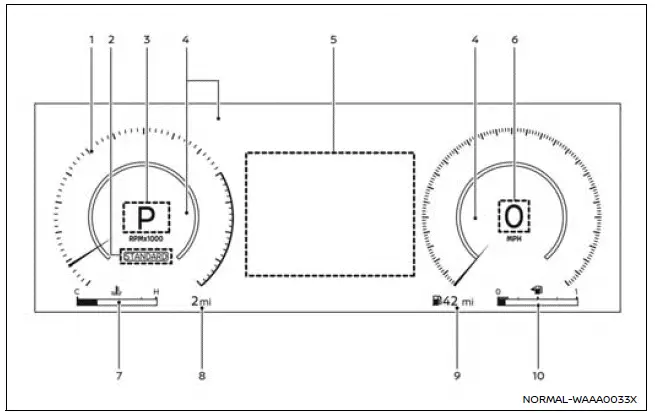
Example
The instrument cluster in the Nissan Armada is designed to provide clear, real-time information about vehicle performance and status. It combines modern digital displays with traditional gauges to ensure the driver can monitor all critical systems efficiently.
- Tachometer — displays engine speed in RPM for optimal performance control.
- Drive Mode Selector indicator* — shows the currently selected driving mode.
- Automatic Transmission (AT) position indicator — indicates the active gear position.
- Warning and indicator lights — alert the driver to system status and potential issues.
- Vehicle information display — provides detailed operational data and settings.
- Speedometer — shows current vehicle speed.
- Engine coolant temperature gauge — monitors engine thermal condition.
- Odometer — displays total distance traveled by the Nissan Armada.
- Distance to empty (DTE) — estimates remaining driving range.
- Fuel gauge — indicates fuel level in the tank.
*: if so equipped
Changing the meter screen view
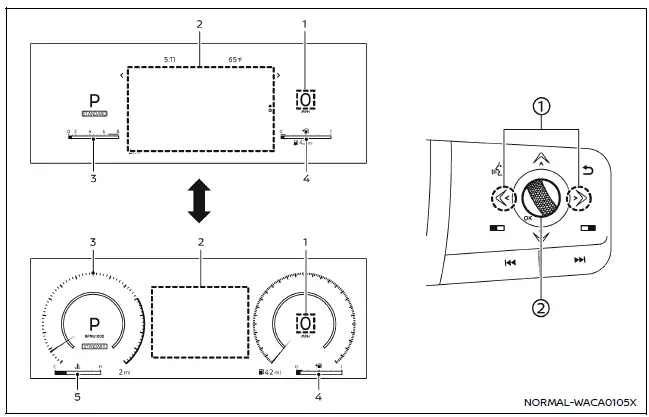
Example
- Speedometer
- Vehicle information display
- Tachometer
- Fuel gauge
- Engine coolant temperature gauge
The Nissan Armada allows drivers to customize the instrument display layout to match their preferences, improving usability and driving comfort.
To adjust the meter screen view in the Nissan Armada:
1. Press the left or right arrow button 1 to access the "Settings" menu within the vehicle information display, then confirm using the scroll dial.
2. Rotate the scroll dial 2 to select "Customize Display" and press the dial to proceed.
3. Continue rotating the dial to choose "Change Meter View" and confirm your selection.
Speedometer and odometer
Example
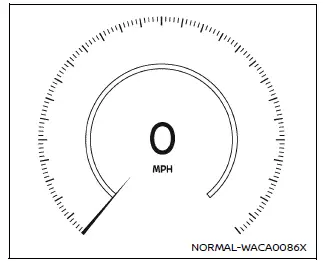
Speedometer
The speedometer in the Nissan Armada displays vehicle speed in both miles per hour (MPH) and kilometers per hour (km/h), allowing for easy interpretation in various driving environments.
Example
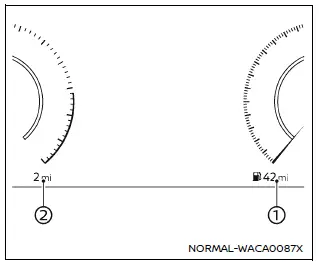
Distance to empty (dte)/Odometer
Distance to empty (dte):
The DTE function in the Nissan Armada estimates how far the vehicle can travel before refueling is required. This calculation is continuously updated based on fuel level and current driving conditions.
The display refreshes approximately every 30 seconds, ensuring up-to-date range information.
The Nissan Armada also includes a low-fuel warning feature within the DTE system. When fuel levels drop, a warning appears on the display. If the level becomes critically low, the DTE value will change to "---".
- If only a small amount of fuel is added, the previously displayed range may remain unchanged temporarily.
- Driving uphill or navigating curves may cause fuel to shift within the tank, resulting in temporary fluctuations in the DTE reading.
Odometer:
The odometer in the Nissan Armada shows the total accumulated mileage of the vehicle, providing an accurate record of overall usage.
Tachometer
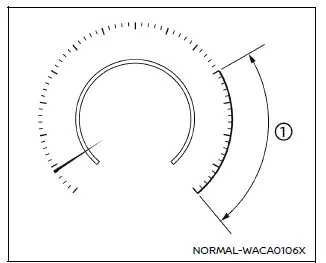
Example
The tachometer indicates engine speed in revolutions per minute (RPM). For safe operation of the Nissan Armada, avoid allowing the engine speed to enter the red zone 1.
CAUTION
When engine speed approaches the red zone, shift to a higher gear or reduce engine speed. Operating the Nissan Armada engine in the red zone may lead to severe engine damage.
Engine coolant temperature gauge
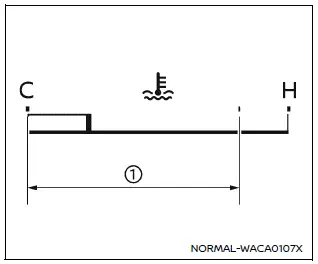
Example
This gauge displays the engine coolant temperature in the Nissan Armada.
The temperature is considered normal when the indicator remains within the designated zone 1 shown in the display.
Engine temperature may vary depending on driving conditions and ambient temperature.
CAUTION
- If the temperature gauge in the Nissan Armada approaches the high (H) range, reduce vehicle speed to help lower engine temperature.
- If the gauge exceeds the normal range, stop the vehicle safely and allow the engine to idle until it cools down.
- Continuing to operate an overheated Nissan Armada engine may result in serious mechanical damage.
The Nissan Armada instrument cluster is designed to keep the driver fully informed at all times, helping to ensure safe operation, efficient driving, and early detection of potential issues.
Fuel gauge
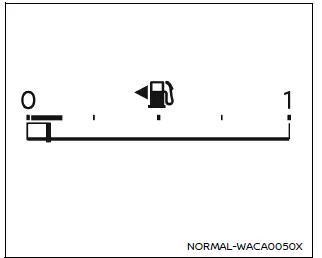
Example
In the Nissan Armada, the fuel gauge provides a clear and approximate indication of the fuel level inside the tank whenever the ignition switch is in the ON position. This allows the driver to monitor fuel consumption and plan refueling accordingly.
Due to natural fuel movement inside the tank, the fuel gauge in the Nissan Armada may fluctuate slightly during braking, acceleration, cornering, or when driving on inclines and declines. This behavior is normal and does not indicate a malfunction.
When the fuel level becomes low, a warning indicator
 appears on the vehicle information display. It is strongly recommended to refuel
the Nissan Armada as soon as possible, ideally before the gauge reaches the empty
(0) mark.
appears on the vehicle information display. It is strongly recommended to refuel
the Nissan Armada as soon as possible, ideally before the gauge reaches the empty
(0) mark.
The directional arrow
 indicates the side of the vehicle where the fuel filler door is located, helping
to avoid confusion at fuel stations.
indicates the side of the vehicle where the fuel filler door is located, helping
to avoid confusion at fuel stations.
Refuel before the gauge reaches the empty (0) position.
Even when the fuel gauge in the Nissan Armada shows empty, a small reserve of fuel remains in the tank. However, relying on this reserve is not recommended for safe operation.
CAUTION
- If the Nissan Armada runs out of fuel completely, the malfunction indicator
light (MIL)
 may illuminate. Refuel the vehicle promptly. After several driving cycles, the
indicator
may illuminate. Refuel the vehicle promptly. After several driving cycles, the
indicator
 should turn off.
If the warning light remains illuminated after multiple trips, have the Nissan Armada inspected by a qualified NISSAN dealer.
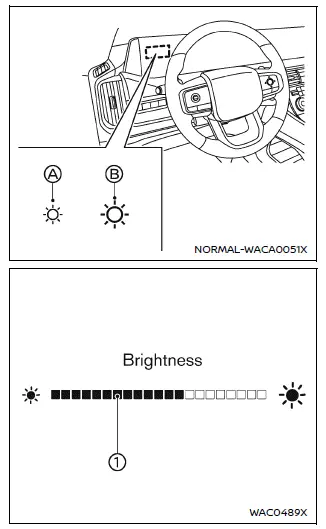
Instrument brightness control
The instrument brightness control in the Nissan Armada allows adjustment of dashboard illumination for optimal visibility in different lighting conditions. This function is available when the ignition switch is in the ON position.
When activated, the vehicle information display switches to brightness adjustment mode.
Touch switch A to reduce brightness. The indicator bar 1 will move toward the left.
Touch switch B to increase brightness. The indicator bar 1 will move toward the right.
If no adjustments are made for more than 5 seconds, the Nissan Armada display will automatically return to its normal view.
Automatic Transmission (AT) position indicator
The AT position indicator in the Nissan Armada clearly shows the currently selected gear position when the ignition is ON, helping the driver maintain full control of the vehicle’s transmission state.
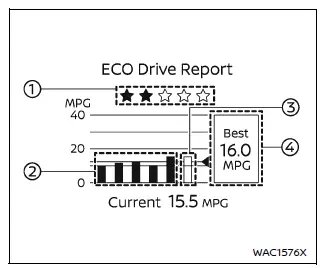
ECO Drive Report
The ECO Drive Report feature in the Nissan Armada provides valuable feedback on driving efficiency and fuel economy. This information is displayed when the ignition is turned ON or OFF.
- ECO evaluation — assesses current driving efficiency.
- Previous 5 times (History) — displays past driving performance.
- Current fuel economy — shows fuel efficiency since last reset.
- Best fuel economy — records the highest efficiency achieved.
The ECO evaluation in the Nissan Armada becomes available after approximately 10 minutes of driving, ensuring accurate data collection.
1: The more efficiently the Nissan Armada is driven, the more
 will appear, encouraging fuel-efficient driving habits.
2: Displays the average fuel consumption for the previous five trips.
3: Shows the average fuel economy calculated since the last reset.
4: Indicates the best recorded fuel efficiency in the vehicle’s history.
When the message "See Tire Pressure" appears in the ECO Drive Report of the Nissan Armada, the display can be switched to the tire pressure screen by pressing the scroll dial on the steering wheel, allowing quick access to additional vehicle data.
The Nissan Armada combines advanced instrumentation with intuitive controls to provide drivers with precise feedback, helping optimize fuel efficiency, vehicle performance, and overall driving experience.
 Instrument panel
Example
The instrument panel of the Nissan Armada combines advanced technology with ergonomic
design, providing clear visibility of all essential driving information while maintaining
easy ac ...

Other materials:
Passenger Sensing System
United States
Canada
The passenger sensing system turns off the front outboard passenger frontal airbag
and knee airbag (if equipped) under certain conditions. No other airbag is affected
by the passenger sensing system. See Passenger Sensing System for important
information.
The ...
3rd row seats
Basic information
The third row seating area in the Nissan Armada is engineered to deliver both
flexibility and safety, ensuring that passengers benefit from comfort while maintaining
proper restraint system performance. Correct usage of the 3rd row seats in the Nissan
Armada is essential for ...
Locking with power door lock switch
Driver's armrest
Front passenger's armrest
Basic information
The Nissan Armada power door lock system allows centralized locking and unlocking
of all doors using switches located on both the driver’s and front passenger’s doors.
To lock all doors, press the switch to the lo ...

0.0065