
Chevrolet Sonic Repair Manual: Communication Interface Module Bracket Replacement
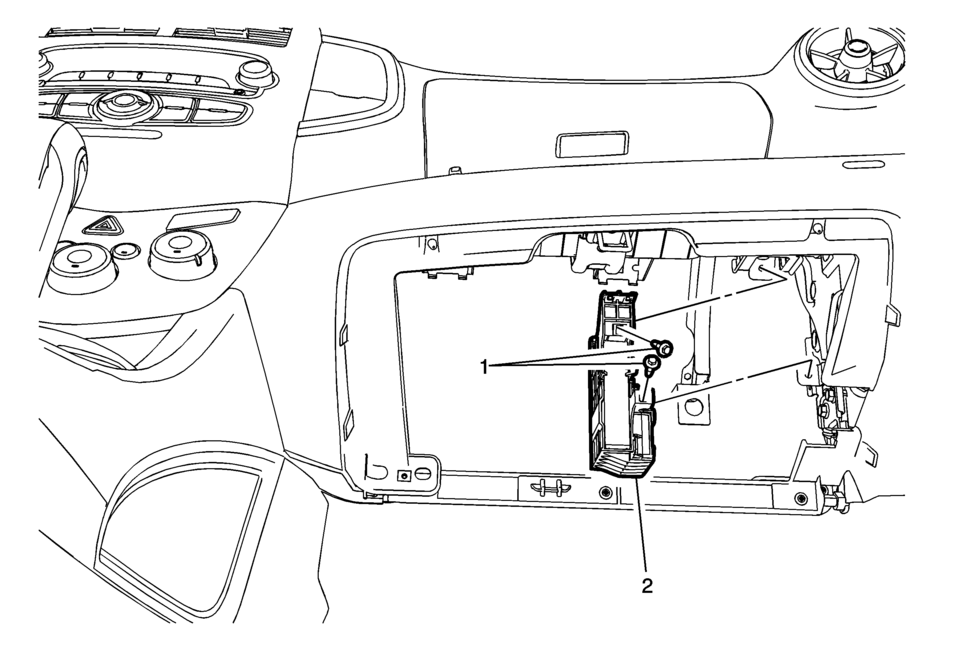
|
Callout |
Component Name |
|---|---|
|
Preliminary Procedure
Remove the instrument panel lower compartment. Refer to Instrument Panel Lower Compartment Replacement |
|
|
1 |
Communication Interface Module Bracket Bolts (Qty: 2) Caution: Refer to Fastener Caution. |
|
2 |
Communication Interface Module Bracket Procedure
|
 Communication Interface Module Battery Replacement
Communication Interface Module Battery Replacement
Callout
Component Name
Preliminary Procedure
Remove the instrument panel low ...
 Communication Interface Module Replacement
Communication Interface Module Replacement
Callout
Component Name
Preliminary Procedure
Remove the instrument panel lower compartme ...
Other materials:
Speaker Replacement Reference
Speaker Replacement Reference
Component
Repair Instruction
Front Door Speaker
Radio Front Side Door Speaker Replacement
Front Tweeter Speaker
Radio Windshield Side Garnish Molding Speaker
...
Communication Interface Module Replacement
Communication Interface Module Replacement
Callout
Component Name
Preliminary Procedure
Remove the instrument panel lower compartment.
Refer to Instrument Panel Lower Compartment
Replacement.
Remove the instrument pa ...
Steering Angle Sensor Centering
The steering angle sensor does not require centering often. Centering of the
steering angle sensor might be required after certain service procedures are performed.
Some of these procedures are as follows:
Wheel alignment
Steering gear replacement
Steering column replacement
Collision ...

0.0054