
Nissan Armada 2025-2026 Owner's Manual: Differential lock mode switch
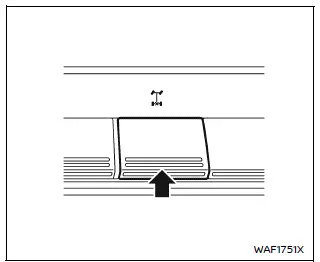
The rear differential lock (DIFF-LOCK) in the Nissan Armada is designed to distribute engine torque evenly between the left and right rear wheels, ensuring balanced traction in demanding driving conditions.
When the Nissan Armada becomes stuck in challenging environments such as sand, snow, mud, or when one wheel loses contact with the ground, a standard differential may send power to the wheel with the least resistance, causing it to spin freely. This reduces traction on the opposite wheel. By engaging the rear differential lock, both rear wheels rotate together as a single unit, significantly improving the ability of the Nissan Armada to regain traction and move forward.
To activate the differential lock in the Nissan Armada, reduce vehicle speed
to below 4 MPH (7 km/h) and shift the 4WD system into the 4L position. Then press
the differential lock mode switch to the "ON" position. The DIFF-LOCK indicator
light " "
will flash on the instrument panel and remain steadily illuminated once the differential
is fully engaged.
"
will flash on the instrument panel and remain steadily illuminated once the differential
is fully engaged.
After using the differential lock, or during normal driving conditions, switch the DIFF-LOCK back to the "OFF" position. The indicator light will turn off once the system is disengaged, restoring normal differential operation in the Nissan Armada.
- The rear differential lock system in the Nissan Armada operates only when the engine is running.
- When the Nissan Armada is in AUTO or 4H mode, the differential lock will not engage even if the switch is turned ON. In this case, the DIFF-LOCK indicator will flash, indicating that activation conditions are not met.
WARNING
- Use the Nissan Armada DIFF-LOCK feature only in emergency situations when the vehicle cannot be freed using standard 4WD modes such as 4L.
- When the differential lock is engaged, turning the Nissan Armada becomes more difficult, especially at higher speeds. This can lead to loss of control or damage to drivetrain components.
- While the DIFF-LOCK is active, the Anti-lock Braking System (ABS) warning light will illuminate, indicating that ABS functionality may be limited.
- Do not activate the Nissan Armada differential lock while the vehicle
is turning or when only one wheel is spinning.
Improper use may cause severe damage to the drivetrain system.
- Avoid aggressive acceleration when the DIFF-LOCK is engaged, as this may place excessive stress on drivetrain components in the Nissan Armada.
Always follow these precautions when using the Nissan Armada differential lock system. Failure to do so may result in reduced steering control, potential accidents, and serious injury.
 4WD shift switch
Example
Select the appropriate 4WD mode in the Nissan Armada by shifting the 4WD
switch to AUTO, 4H, or 4L (if equipped), depending on current road and driving
conditions. This flexibili ...

Other materials:
Rear Side Door Weatherstrip Replacement - Body Side
Rear Side Door Weatherstrip Replacement - Body Side
Callout
Component Name
Preliminary Procedures
Remove the upper center pillar trim. Refer to Center Pillar Upper
Trim Panel Replacement.
Remove the lower center pillar tr ...
Body Side Trim Panel Replacement (Sedan)
Body Side Trim Panel Replacement
Callout
Component Name
Preliminary Procedures
Remove rear side door opening floor carpet retainer. Refer to Rear
Side Door Opening Floor Carpet Retainer Replacement.
Remove body rear seat ...
Turn Signal Multifunction Switch Replacement
..
Turn Signal Multifunction Switch Replacement
Callout
Component Name
Preliminary Procedure
Remove the upper trim cover and the lower trim cover from the steering
column. Refer to Steering Column Lower Trim Cover Replacemen ...

0.0058