
Chevrolet Sonic Repair Manual: Drive Belt Tensioner Removal
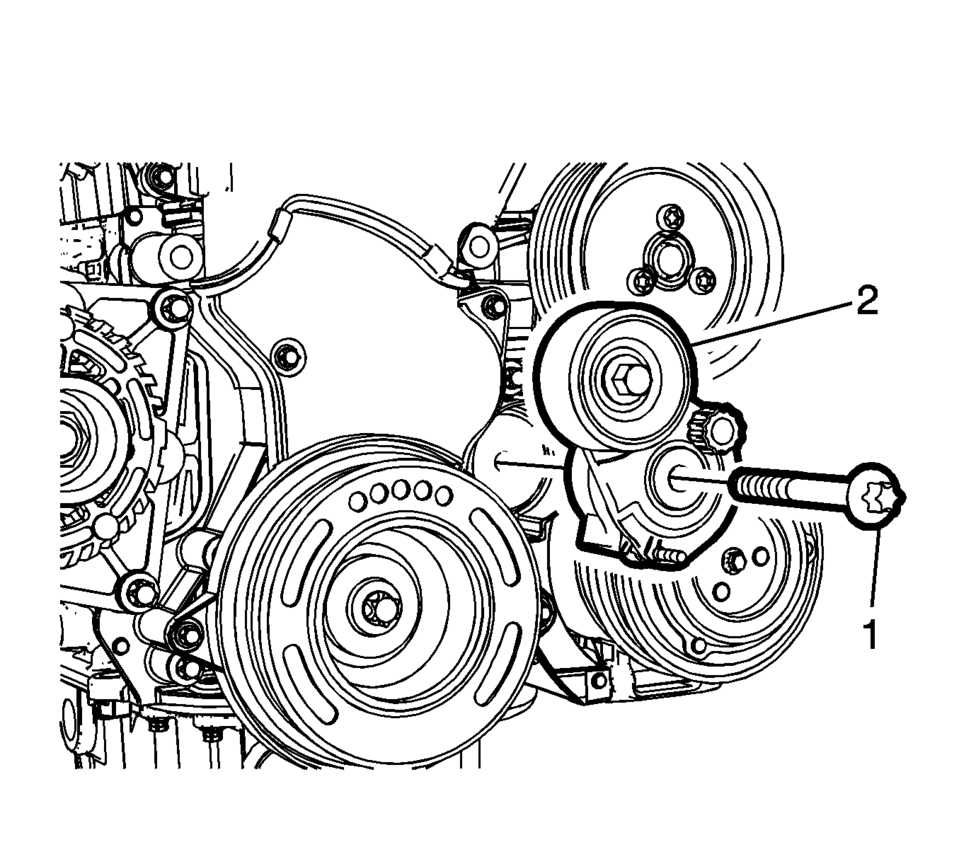
- Remove the drive belt tensioner bolt (1).
- Remove the drive belt tensioner (2).
 Drive Belt Tensioner Installation
Install the drive belt tensioner (1).
Install the upper drive belt tensioner bolt (2).
Install the lower drive belt tensioner bolt (3).
Caution: Refer to Fastene ...
 Drive Belt Tensioner Replacement
Special Tools
EN-955 Locking Pin
EN-48488 Holding Wrench
For equivalent regional tools, refer to Special Tools.
Removal Procedure
Remove the right front wheelhouse liner extens ...
Other materials:
Front and Rear Suspension Modification Kit Installation
Installation Instruction Part Number
23158166
23158167
Tools Required
CH 49375 Strut Rod Nut Socket
For equivalent regional tools, refer to Vehicle Service Manual.
Front Strut Removal Procedure
Remove the air inlet grille panel. Refer to Vehicle Service Manual.
Raise a ...
Fuel and Evaporative Emission Pipe Warning
Warning: In order to reduce the risk of fire and personal injury observe
the following items:
Replace all nylon fuel pipes that are nicked, scratched or damaged during
installation, do not attempt to repair the sections of the nylon fuel pipes
Do not hammer directly on the fu ...
Battery
Basic information
On the Nissan Armada, batteries labeled "do not open" are fully maintenance-free,
meaning the internal electrolyte level does not require inspection. For accurate
diagnostics and performance checks, it is strongly recommended to consult an
authorized NISS ...

0.0064