
Chevrolet Sonic Owner's Manual: Exterior Lamp Controls
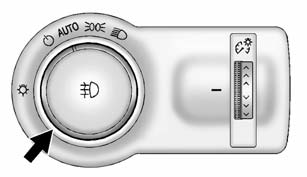
The exterior lamp control is on the instrument panel to the outboard side of the steering column.
There are four positions:
 (Off): Briefly turn to this position
to turn the automatic light control off or on again.
AUTO (Automatic): Turns the headlamps on automatically at normal brightness, together with the following:
- Parking Lamps
- Taillamps
- License Plate Lamps
- Instrument Panel Lights
- Sidemarker Lamps
 (Parking Lamps): Turns on the parking
lamps including all lamps except the headlamps.
 (Headlamps): Turns the headlamps
on together with the parking lamps and instrument panel lights. A warning chime
sounds if the driver door is opened when the ignition switch is off and the headlamps
are on.
 (Front Fog Lamps): If equipped
with fog lamps, press to turn the lamps on or off.
If equipped with fog lamps, press to turn the lamps on or off.
See Fog Lamps.
When the lights are on, will be
lit. See Lamps On Reminder.

 Headlamp High/Low-Beam Changer
(Headlamp High/Low-Beam Changer):
Push the turn signal lever away from you to turn the high beams on.
Push the lever again or pull the lever toward you to return to low beams.
This indicator ...
Other materials:
Airbag Roof Side Rail Module Replacement - Rear
Airbag Roof Side Rail Module Replacement - Rear
Callout
Component Name
Warning: In order to prevent SIR deployment, personal injury,
or unnecessary SIR system repairs, do not strike the door or the door
pillar in the ...
Parking Brake Adjustment (Disc Brake)
Note: The park brake cable adjusting nut is a nylon lock type. Use
ONLY HAND TOOLS whenever tightening or loosening the adjusting nut.
Apply and fully release the park brake several times. Verify that the park
brake lever releases completely.
Turn ON the ignition. Verify the red B ...
Rear Brake Hose Replacement (Axle to Caliper)
Removal Procedure
Warning: Refer to Brake Dust Warning.
Warning: Refer to Brake Fluid Irritant Warning.
Raise and support the vehicle. Refer to Lifting and Jacking the Vehicle.
Remove the tire and wheel assembly. Refer to Tire and Wheel Removal
and Install ...

0.0051