
Nissan Armada 2025-2026 Owner's Manual: Fog light switch
Front fog lights
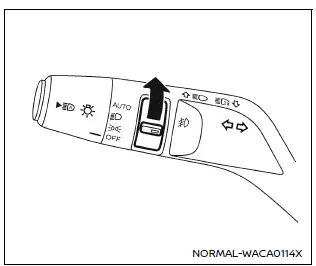
Front fog lights (example)
In the Nissan Armada, the front fog lights are designed to improve visibility in challenging weather conditions such as fog, rain, or snow by illuminating the road surface at a lower angle.
To activate the fog lights in the Nissan Armada, first rotate the headlight switch
to the
 position, and then turn the fog light switch to the
 position.
To turn the fog lights off, rotate the switch back to the OFF position. In the Nissan Armada, the fog lights will only operate when the low beam headlights are active and will automatically switch off when the high beams are engaged.
This ensures proper lighting distribution and prevents glare for other drivers.
 Headlight and turn signal switch
Headlight switch
Basic information
CAUTION
In the Nissan Armada, always operate the headlights with the engine running
to prevent unnecessary battery discharge and ensure reliable electrical sys ...
 Horn
Horn
To sound the horn in the Nissan Armada, press firmly on the center pad area of
the steering wheel.
The horn is an essential safety feature used to alert other road users and prevent
potential ...
Other materials:
Front Side Door Window Switch Bezel Replacement (Right Side)
Front Side Door Window Switch Bezel Replacement
Callout
Component Name
Preliminary Procedure
Remove the front side door trim. Refer to Front Side Door Trim Replacement.
1
Front Side Door Window S ...
Transmission Mount Bracket Replacement - Left Side
Removal Procedure
Remove the left transmission mount. Refer to
Transmission Mount Replacement - Left Side.
Remove the three left transmission mount bracket to
transmission bolts (1).
Remove the left transmission mount bracket (2) from
the transmis ...
Vehicle information display warnings and indicators
Engine start operation indicator
In the Nissan Armada, this indicator is displayed when the gear selector is positioned
in P (Park), confirming that the vehicle is in a safe state for engine start.
This symbol informs the driver that the Nissan Armada engine can be started by
pressing the ...

0.0141