
Chevrolet Sonic Repair Manual: Front Bumper Fascia Replacement
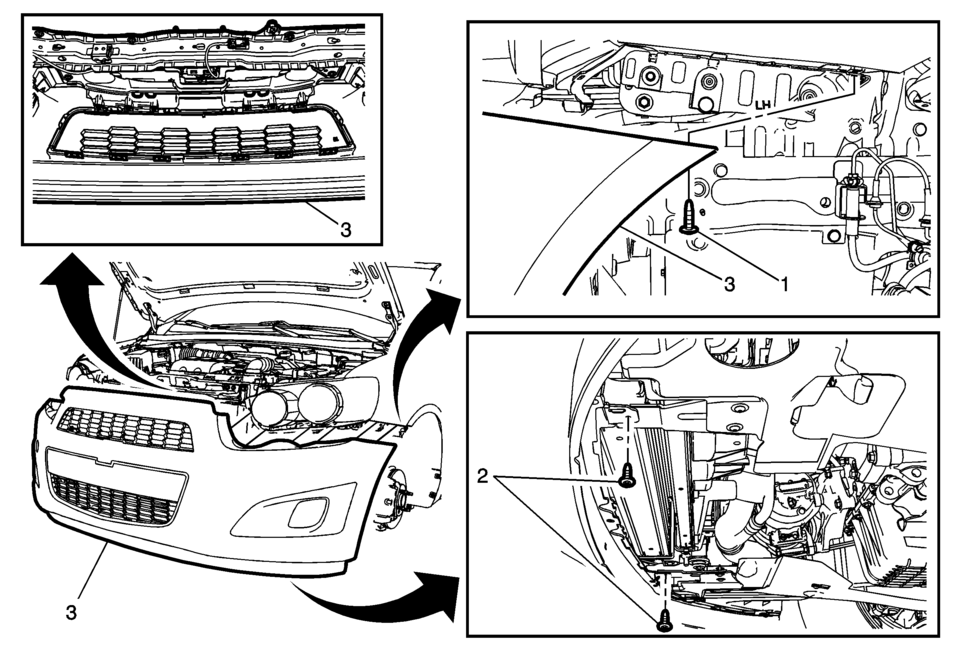
|
Callout |
Component Name |
|---|---|
Preliminary Procedures
|
|
|
1 |
Front Bumper Fascia Screw (Qty:?€‰2) Caution: Refer to Fastener Caution.
6?€‰Y (53?€‰lb?€‰in) |
|
2 |
Front Bumper Fascia Lower Screw (Qty:?€‰2) Tighten
6?€‰Y (53?€‰lb?€‰in) |
|
3 |
Front Bumper Fascia Procedure
|
 Front Bumper Fascia Opening Lower Cover Replacement
Front Bumper Fascia Opening Lower Cover Replacement
Callout
Component Name
1
Front Bumper Fascia Opening Lower Cover Pus ...
 Front Bumper Fascia Tow Eye Access Hole Cover Replacement
Front Bumper Fascia Tow Eye Access Hole Cover Replacement
Callout
Component Name
1
Front Bumper Fascia Front Tow Eye Acc ...
Other materials:
Remote Vehicle Start
If equipped, this feature allows the engine to be started from outside the vehicle.
(Remote Vehicle Start): This button
will be on the RKE transmitter if the vehicle has remote start.
The climate control system will use the previous settings during a remote start.
The rear defog may come on d ...
Safety Locks
The rear door safety locks prevent passengers from opening the rear doors from
inside the vehicle.
Manual Safety Locks
If equipped, the safety lock is located on the inside edge of the rear doors.
To use the safety lock:
1. Insert the key into the safety lock slot and turn it so the slot is ...
Sunroof Actuator Motor Replacement
Sunroof Actuator Motor Replacement
Callout
Component Name
Preliminary Procedure
Remove the dome lamp bezel. Refer to Dome Lamp Bezel Replacement.
1
Sunroof Actuator Motor Screw (Qty:?€‰3)
...

0.0086