
Chevrolet Sonic Repair Manual: Front Floor Console Cup Holder Replacement
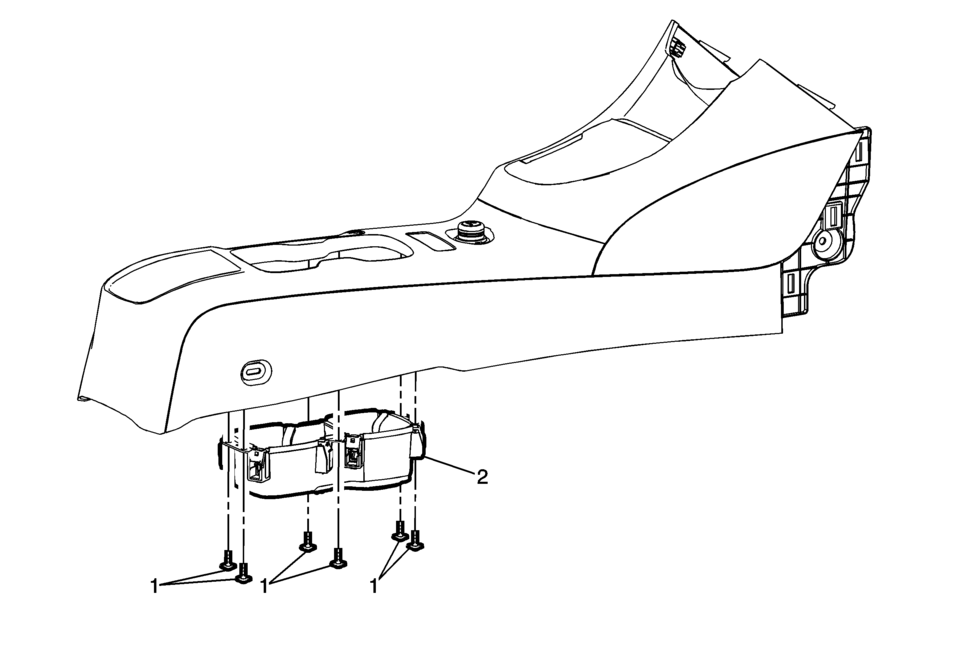
|
Callout |
Component Name |
|---|---|
|
Preliminary Procedure
Remove the front floor console assembly. Refer to Front Floor Console Replacement. |
|
|
1 |
Front Floor Console Cup Holder Fasteners (Qty:?€‰6) Caution: Refer to Fastener Caution. |
|
2 |
Front Floor Console Cup Holder Assembly |
 Front Floor Console Cover Replacement (Manual Transmission)
Removal Procedure
Use a flat bladed plastic trim tool in order to release the retainers
securing the console cover?€‰(1) to the console assembly.
Reach under t ...
 Front Floor Console Extension Replacement - Left Side
Front Floor Console Extension Replacement - Left Side
Callout
Component Name
1
Front Floor Console Extension Push-In Ret ...
Other materials:
Automatic Transmission Fluid
How to Check Automatic Transmission Fluid
It is not necessary to check the transmission fluid level. A transmission fluid
leak is the only reason for fluid loss. If a leak occurs, take the vehicle to your
dealer and have it repaired as soon as possible.
There is a special procedure for checkin ...
Basecoat/Clearcoat Paint Systems
Warning: Exposure to isocyanates during paint preparation and application
processes can cause severe breathing problems. Read and follow all of the instructions
from the manufacturers of painting materials, equipment, and protective gear.
All paint finish repairs of rigid exterior sur ...
Airbag Instrument Panel Module Replacement
Airbag Instrument Panel Module Replacement
Callout
Component Name
Warning: Refer to SIR Inflator Module Handling and Storage
Warning.
Warning: Refer to SIR Warning.
Preliminary Procedure
Disable t ...

0.0066