
Nissan Armada 2025-2026 Owner's Manual: Front seats
Front power seat adjustment
The Nissan Armada front seats are equipped with advanced power adjustment features designed for comfort and ergonomic support during long drives.
Operating tips:
- The power seat motor includes an automatic overload protection system. If adjustment stops unexpectedly, wait approximately 30 seconds before using the switch again.
- To prevent battery discharge in your Nissan Armada, avoid adjusting the power seats for extended periods when the engine is off.
The front power seats in the Nissan Armada may also be controlled through the touch screen display, depending on vehicle configuration.
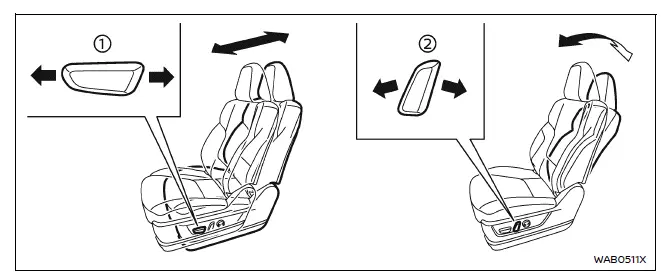
Forward and backward:
Move the adjustment switch 1 forward or backward to position the seat as desired for optimal comfort and visibility.
Reclining:
Use adjustment switch 2 to change the angle of the seatback according to your preferred seating position.
The reclining function in the Nissan Armada allows drivers and passengers of different body types to achieve proper seat belt positioning and improved comfort.
The seatback may also be reclined when the vehicle is parked, allowing occupants to rest comfortably inside the Nissan Armada.
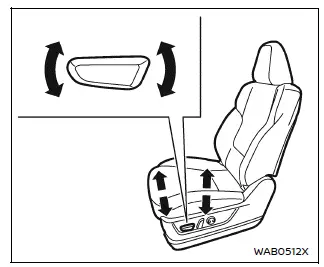
Seat lifter (if so equipped):
Adjust the height and angle of the seat cushion using the switch as illustrated, ensuring better driving posture and road visibility in the Nissan Armada.
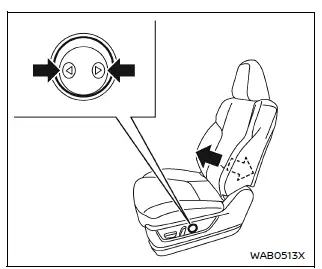
Type A (if so equipped)
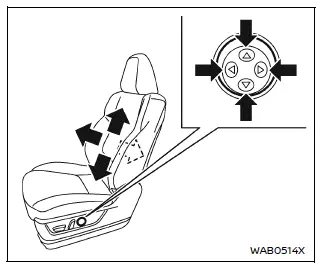
Type B (if so equipped)
Lumbar support (if so equipped)
The Nissan Armada offers lumbar support adjustment to enhance lower back comfort for both the driver and front passenger.
Use the switch as shown to increase or decrease lumbar support until the ideal seating position is achieved.
NOTE:
During extended use, air pressure in the lumbar system may decrease. If this occurs, press the switch backward for about 15 seconds to release air completely, then press forward to refill and restore your preferred support level.
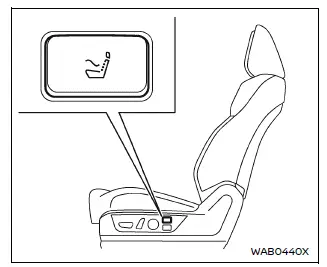
Massage function (if so equipped)
The Nissan Armada includes an advanced seat massage feature designed to enhance comfort during long journeys.
With the engine running and all doors closed, press the switch to activate the massage function. Press again to stop.
The system automatically deactivates after approximately 30 minutes of continuous use.
Massage modes can be customized via the touchscreen display in the Nissan Armada.
NOTE:
If lumbar support is set to a high level, the massage function may take slightly longer to initiate.
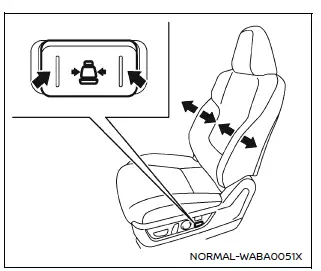
Side support (if so equipped)
The side support system in the Nissan Armada improves lateral body stability for both the driver and front passenger, especially during cornering.
Adjust the side bolsters using the switch until the desired support level is achieved.
Press the front of the switch to tighten support and the rear to loosen it.
NOTE:
As with lumbar support, air pressure may decrease over time. Reset the system by releasing and refilling the air using the switch as described above.
 Basic information
This section of the Nissan Armada manual provides essential safety guidance regarding
seat positioning, seat belt usage, and overall occupant protection. Proper seating
posture in the Nissan A ...
 2nd row seats
Basic information
The second row seating system in the Nissan Armada is designed to provide a balance
of comfort, flexibility, and safety for passengers. Proper operation and positioning
of the 2 ...
Other materials:
Rear Seat Back Cushion Removal and Installation (40%)
Rear Seat Back Cushion Removal and Installation
Callout
Component Name
Preliminary Procedure
Remove the rear seat cushion. Refer to Rear Seat Cushion Removal
and Installation.
Remove the rear seat back cushion bolster. Re ...
Windshield Washer Solvent Container Filler Tube Replacement
Windshield Washer Solvent Container Filler Tube Replacement
Callout
Component Name
Preliminary Procedure
Open and support the hood assembly.
Grasp the top portion of the windshield washer container filler
tube and rotate t ...
How to activate/deactivate the automatic brake hold function
To enable the automatic brake hold feature in your Nissan Armada, ensure the
ignition switch is in the ON position, then press the automatic brake hold switch
1. Once activated, the indicator light on the switch 2 will illuminate, confirming
that the system is ready for operation.
When ...

0.0062