
Nissan Armada 2025-2026 Owner's Manual: How to activate/deactivate the automatic brake hold function
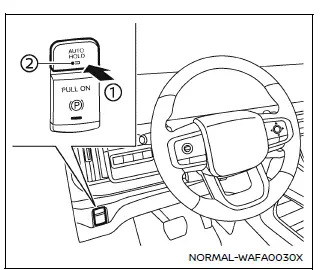
To enable the automatic brake hold feature in your Nissan Armada, ensure the ignition switch is in the ON position, then press the automatic brake hold switch 1. Once activated, the indicator light on the switch 2 will illuminate, confirming that the system is ready for operation.
When the Nissan Armada automatic brake hold system enters standby mode, the corresponding indicator light (white) will illuminate, signaling that the function is available for use.
How to activate the automatic brake hold function
Before the Nissan Armada automatic brake hold function can actively maintain braking force, the following conditions must be met:
- The driver’s seat belt must be securely fastened.
- The electronic parking brake must be released.
- The Nissan Armada must not be in the P (Park) position.
- The vehicle must not be positioned on a steep incline.
NOTE:
The Nissan Armada automatic brake hold system retains its last selected state even after the ignition is turned off, unless manually changed by the driver.
How to deactivate the automatic brake hold function
To turn off the Nissan Armada automatic brake hold feature, press the automatic brake hold switch again. The indicator light will turn off, confirming that the system has been deactivated.
If the braking force is currently being held by the Nissan Armada automatic brake hold system, first press and hold the brake pedal, then deactivate the function using the switch.
WARNING
Always press and hold the brake pedal firmly when deactivating the automatic brake hold function while braking force is applied. Once the function is turned off, braking force will be released immediately, which may cause the Nissan Armada to move unexpectedly.
Failure to properly secure the vehicle may result in unintended movement, leading to serious injury or property damage.
 Basic information
The Nissan Armada is equipped with an advanced automatic brake hold function
designed to enhance driving convenience in stop-and-go traffic conditions. This
system automatically maintains braking ...
 How to use the automatic brake hold function
Basic information
For optimal use of the Nissan Armada automatic brake hold system, follow the
operational guidelines outlined below to ensure safe and effective performance.
To maintain braking f ...
Other materials:
Center Pillar Upper Trim Panel Replacement
Center Pillar Upper Trim Panel Replacement
Callout
Component Name
Preliminary Procedure
Remove the center pillar lower trim panel. Refer to Center Pillar
Lower Trim Panel Replacement.
Remove the seat belt from the front s ...
Throttle Body Heater Inlet Pipe Replacement (LUW)
Throttle Body Heater Inlet Pipe Replacement
Callout
Component Name
Preliminary Procedure
Drain the cooling system. Refer to Cooling System
Draining and Filling.
1
Throttle Body Heater Inlet Pipe ...
Differential lock mode switch
The rear differential lock (DIFF-LOCK) in the Nissan Armada is designed to distribute
engine torque evenly between the left and right rear wheels, ensuring balanced traction
in demanding driving conditions.
When the Nissan Armada becomes stuck in challenging environments such as sand,
sno ...

0.0048