
Nissan Armada 2025-2026 Owner's Manual: Fuses
Engine compartment
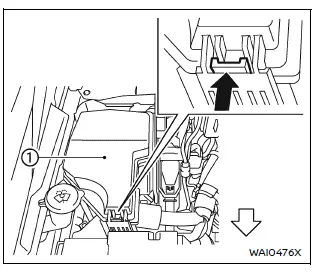
Basic information
WARNING
Never install a fuse in your Nissan Armada with an amperage rating different from the specified value shown on the fuse box cover. Using an incorrect fuse can lead to serious electrical damage, malfunction of control modules, or even fire hazards.
If any electrical component in your Nissan Armada stops functioning, always begin diagnosis by checking the corresponding fuse.
1. Ensure the ignition switch is set to the OFF position and all electrical loads, including headlights, are turned off.
2. Open the hood of your Nissan Armada.
3. Remove the fuse or fusible link cover 1 to access the fuse panel.
4. Using the fuse puller provided, carefully remove the suspect fuse.
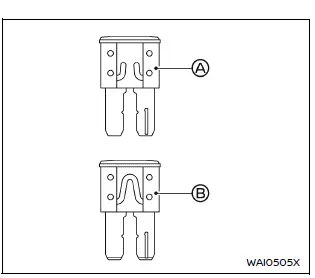
5. Inspect the fuse. If it is blown A, replace it with a new fuse B of identical rating. Spare fuses for your Nissan Armada are typically located in the passenger compartment fuse box.
6. If the replacement fuse also fails, this indicates a deeper electrical issue. Have your Nissan Armada inspected by a qualified technician or authorized NISSAN dealer as soon as possible.
Fusible links
If electrical systems in your Nissan Armada remain inoperative despite intact fuses, inspect the fusible links. If any fusible link is melted or damaged, it must be replaced exclusively with genuine NISSAN components to ensure system integrity and safety.
Passenger compartment
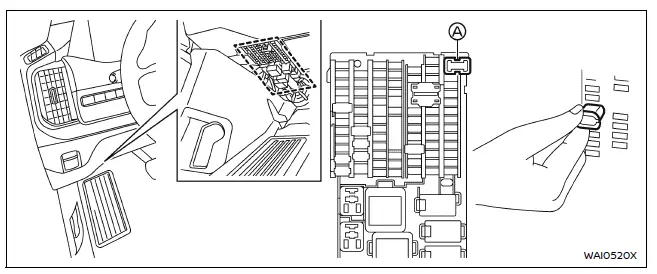
Basic information
WARNING
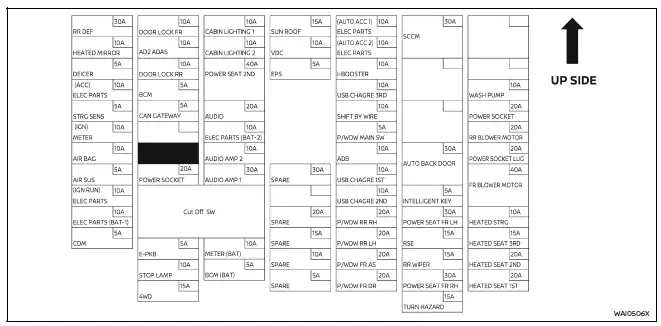
Always use fuses with the correct amperage rating specified for your Nissan Armada. Installing incorrect fuses can compromise the electrical system and create a potential fire risk.
If an electrical feature in your Nissan Armada fails, inspect the relevant fuse in the passenger compartment fuse box.
1. Turn the ignition OFF and ensure all lights are switched off.
2. Remove the fuse using the fuse puller.
3. If the fuse is blown, install a new fuse of the same rating.
4. If the new fuse also fails, have the electrical system of your Nissan Armada professionally diagnosed. Spare fuses are conveniently stored within the fuse box.
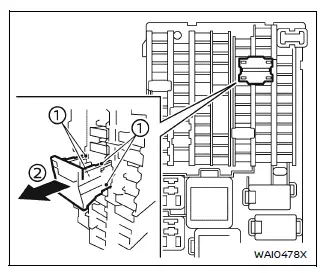
Extended storage fuse switch
The Nissan Armada is equipped with an extended storage fuse switch designed to minimize battery drain during shipping or long-term storage. From the factory, this switch is initially set to OFF and is activated (pushed in) prior to vehicle delivery. It should remain in the ON position during normal use.
If the extended storage fuse switch is not engaged, a warning message such as "Shipping Mode On, Push Storage Fuse" may appear in the Nissan Armada vehicle information display.
If electrical systems are not functioning, remove the extended storage fuse switch and inspect the fuse for failure.
NOTE:
If the extended storage fuse switch becomes faulty or the fuse inside is blown, replacement of the entire switch is not required. Simply replace the fuse with one of the same specification to restore normal operation in your Nissan Armada.
How to remove the extended storage fuse switch:
1. Confirm that the ignition of your Nissan Armada is in the OFF position.
2. Ensure that all lights are turned off.
3. Press and hold the locking tabs 1 on both sides of the storage fuse switch.
4. Carefully pull the storage fuse switch straight out from the fuse box 2.
Proper fuse maintenance and correct handling of the electrical system are essential to ensure the reliability, safety, and long-term performance of your Nissan Armada.
 Brakes
Basic information
If the braking performance of your Nissan Armada becomes inconsistent or reduced,
have the system inspected immediately. Professional service is strongly recommended
to maintain ...
 Intelligent Key battery replacement
WARNING
Serious hazard: Swallowing a button cell battery can result in severe
injury or death.
If a coin-type battery is swallowed, it can cause internal burns within
as little as two hour ...
Other materials:
How the System Works
The LDW camera sensor is on the windshield ahead of the rearview mirror.
To turn LDW on and off, press the LANE DEPART button on the steering wheel. The
control indicator will light when LDW is on.
When the vehicle is started, the LDW indicator on top of the instrument panel
to the right o ...
Instrument Panel Tie Bar Replacement
Removal Procedure
Remove the Instrument panel assembly. Refer to Instrument Panel Assembly
Replacement.
Remove the steering column and wheel from the vehicle. Refer to Steering
Column Replacement.
Remove the air inlet grill panel. Refer to Air Inlet Grille Panel Replacem ...
Idling Stop System display
Basic information
The current operating status of the Idling Stop System in the Nissan Armada can
be easily monitored through the vehicle information display, allowing the driver
to stay informed about system activity and performance.
Idling Stop System indicator
This indicator appears wh ...

0.007